
Serverless applications on AWS with Lambda using Java 25, API Gateway and Aurora DSQL
Serverless applications on AWS with Lambda using Java 25, API Gateway and Aurora DSQL – Part 1 Sample application
Introduction
In this article series, we’ll explain how to implement a serverless application on AWS using Lambda with the support of the released Java 25 version. We’ll also use API Gateway, relational Serverless database Aurora DSQL, and AWS SAM for the Infrastructure as Code. After it, we’ll measure the performance (cold and warm start times) of the Lambda function without any optimizations. Hereafter, we’ll introduce various cold start time reduction approaches like Lambda SnapStart with priming techniques and GraalVM Native Image. In this article, we’ll introduce our sample application.
Sample applications
You can find a code example of our 2 sample applications in my GitHub repositories:
- aws-lambda-java-25-aurora-dsql. Here we use JDBC with Hikari connection pool.
- aws-lambda-java-25-hibernate-aurora-dsql. Here we use Hibernate ORM framework with Hikari connection pool. I think that Hibernate JPA is mostly in use together with frameworks like Spring Boot, Quarkus, or Micronaut (this is the topic of my future article series). But I’d like to show you the implications of adding such a framework to Lambda performance.
For both applications, we’ll use Aurora DSQ JDBC connector, which simplifies dealing with passwords. See my article about this topic.
Please give it a star if you like it, and follow me on GitHub for more examples.
The architecture of the sample applications
The architecture of our sample applications is shown below:
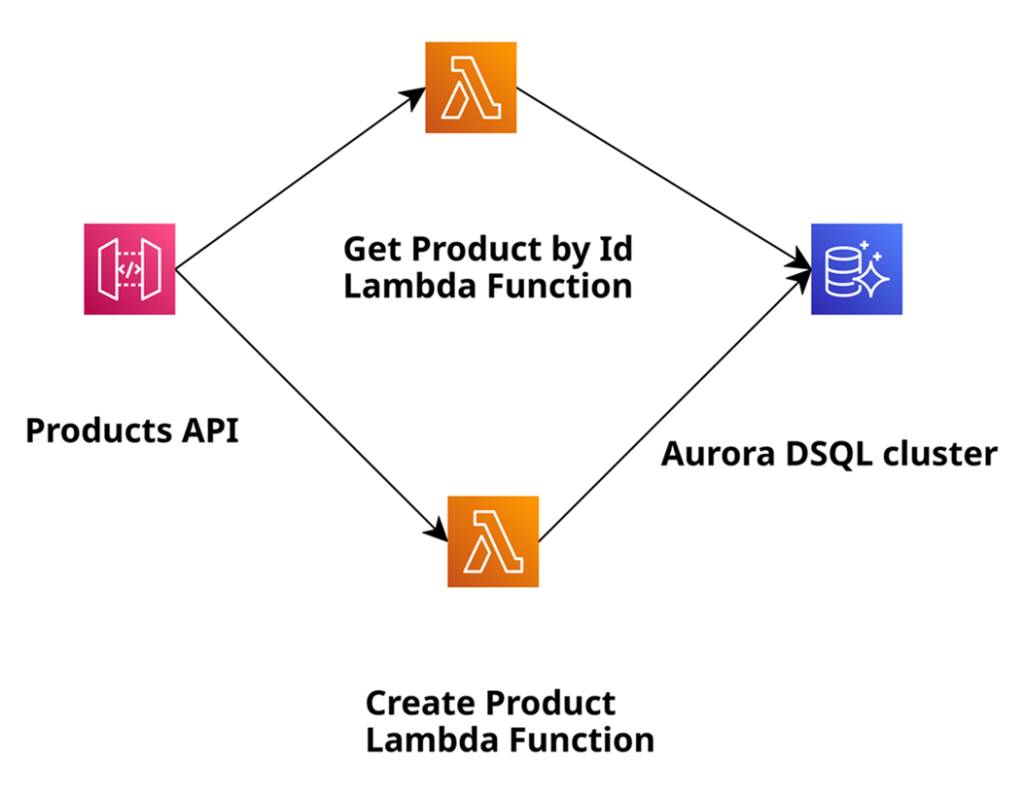
In this application, we will create products and retrieve them by their ID, and use Amazon Aurora DSQL as a relational serverless database for the persistence layer. We use Amazon API Gateway, which makes it easy for developers to create, publish, maintain, monitor, and secure APIs. Of course, we rely on AWS Lambda to execute code without the need to provision or manage servers. We also use AWS SAM, which provides a short syntax optimised for defining infrastructure as code (hereafter IaC) for serverless applications. For this article, I assume a basic understanding of the mentioned AWS services, serverless architectures on AWS, and AWS SAM. The application is intentionally fairly simple. The goal is to demonstrate the general development concepts and cover approaches to reduce the cold start time of the Lambda. Please also watch out for another series where I use No SQL serverless Amazon DynamoDB instead of Aurora DSQL to do the same Lambda performance measurements.
To build and deploy the sample application, we need the following local installations: Java 25, Maven, AWS CLI, and SAM CLI. Later, we’ll also need GraalVM, including its Native Image capabilities. Using it, we’ll build a native image of our application to deploy it on AWS Lambda using the Custom Runtime.
Sample application with JDBC and Hikari connection pool
Let’s start with aws-lambda-java-25-aurora-dsql application, which uses JDBC with Hikari connection pool.
Implement infrastructure as code with AWS SAM
First, we cover the Infrastructure as Code (IaC) part described in AWS SAM template.yaml. We’ll focus only on the parts relevant to the definitions of the Lambda functions there.
In the global section, we define the common properties valid for all defined Lambda functions. To such properties belong code URI, runtime (in our case Java 25), Snapstart usage yes/no, timeout, memory size, and environment variables:
Globals:
  Function:
    CodeUri: ....
    Runtime: java25
    #SnapStart:
      #ApplyOn: PublishedVersions
    Timeout: 30
    MemorySize: 1024
    Architectures:
      - x86_64
    Environment:
      Variables:
         AURORA_DSQL_CLUSTER_ENDPOINT: !Sub ${DSQL}.dsql.${AWS::Region}.on.aws
        ...
Below is an example of the definition of the Lambda function with the name GetProductByIdJava25WithDSQL. We define the handler: a Java class and method that will be invoked. We also give this Lambda function access to the Aurora DSQL cluster that we create within this template. At the end, we define the event to invoke this particular Lambda function. As we use a REST application and API Gateway in front, we define the HTTP method get and the path /products/{id} for it. This means that the invocation of this Lambda function occurs when an HTTP GET request comes in to retrieve the product by its id.
 GetProductByIdFunction:
    Type: AWS::Serverless::Function
    Properties:
      FunctionName: GetProductByIdJava25WithDSQL
      AutoPublishAlias: liveVersion
      Handler: software.amazonaws.example.product.handler.GetProductByIdHandler::handleRequest
      Policies:
        - Version: '2012-10-17' # Policy Document
          Statement:
            - Effect: Allow
              Action:
                - dsql:DbConnectAdmin
              Resource:
                 - !Sub arn:${AWS::Partition}:dsql:${AWS::Region}:${AWS::AccountId}:cluster/${DSQL}

      Events:
        GetRequestById:
          Type: Api
          Properties:
            RestApiId: !Ref MyApi
            Path: /products/{id}
            Method: get
The definition of another Lambda function PostProductJava25WithDSQL is similar.
Implement the business logic with Java 25
Now let’s look at the source code of the GetProductByIdHandler Lambda function that will be invoked when the Lambda function with the name GetProductByIdJava25WithDSQL gets invoked. This Lambda function determines the product based on its ID and returns it:
@Override
public APIGatewayProxyResponseEvent handleRequest(APIGatewayProxyRequestEvent requestEvent, Context context) {
   var id = requestEvent.getPathParameters().get("id");
   var optionalProduct = productDao.getProductById(Integer.valueOf(id));
   if (optionalProduct.isEmpty()) {
	  return new APIGatewayProxyResponseEvent()
           .withStatusCode(HttpStatusCode.NOT_FOUND)
	   .withBody("Product with id = " + id + " not found");
    }
    return new APIGatewayProxyResponseEvent()
         .withStatusCode(HttpStatusCode.OK)
         .withBody(objectMapper.writeValueAsString(optionalProduct.get()));
 }
The only method handleRequest receives an object of type APIGatewayProxyRequestEvent as input, as APIGatewayRequest invokes the Lambda function. From this input object, we retrieve the product ID by invoking requestEvent.getPathParameters().get(“id”) and ask our ProductDao to find the product with this ID in the Aurora DSQL by invoking productDao.getProduct(id). Depending on whether the product exists or not, we wrap the Jackson serialised response in an object of type APIGatewayProxyResponseEvent and send it back to Amazon API Gateway as a response. The source code of the Lambda function CreateProductHandler, which we use to create and persist products, looks similar.
The source code of the Product entity looks very simple:
public record Product(String id, String name, BigDecimal price) {}Implement the data persistence layer
The implementation of the ProductDao persistence layer uses JDBC to write to or read from the Aurora DSQL database. Here is an example of the source code of the getProductById method, which we used in the GetProductByIdHandler Lambda function described above:
public Optional<Product> getProductById(int id) throws Exception {
   try (var con = getConnection();
	  var pst = this.getProductByIdPreparedStatement(con, id);
	  var rs = pst.executeQuery()) {
	  if (rs.next()) {
	      var name = rs.getString("name");
	      int price = rs.getInt("price");
	      var product = new Product(id, name, price);
		   return Optional.of(product);
	      } else {
		    return Optional.empty();
            }
     }
Here, we use the plain Java JDBC API to talk to the database. We use the Hikari connection pool to manage the connection to the database, as creating such a connection is not free. We set up the Hikari pool in the DsqlDataSourceConfig directly in the static initializer block:
   private static final String AURORA_DSQL_CLUSTER_ENDPOINT = System.getenv("AURORA_DSQL_CLUSTER_ENDPOINT");

   private static final String JDBC_URL = "jdbc:aws-dsql:postgresql://"
	+ AURORA_DSQL_CLUSTER_ENDPOINT
	+ ":5432/postgres?sslmode=verify-full&sslfactory=org.postgresql.ssl.DefaultJavaSSLFactory"
	+ "&token-duration-secs=900";

  private static HikariDataSource hds;
  static {
     var config = new HikariConfig();
     config.setUsername("admin");
     config.setJdbcUrl(JDBC_URL);
     config.setMaxLifetime(1500 * 1000); // pool connection expiration time in milli seconds, default 30
     config.setMaximumPoolSize(1); // default is 10

     hds = new HikariDataSource(config);
}
Here we set the use name, JDBC_URL, which is constructed with the help of through Lambda exposed environment variable AURORA_DSQL_CLUSTER_ENDPOINT. We also set max life time of the pool and the maximum connection size to 1. This is enough, as only one Lambda function is executed within the microVM, and we have a single-threaded application. Aurora DSQL JDBC connector handles the logic to retrieve a short-lived token and set it as a password behind the scenes. Each time we invoke getConnection method in the ProductDao, the Hikari Datasource is responsible for obtaining the connection:
public static Connection getPooledConnection() throws SQLException {
   return hds.getConnection();
}
Build and deploy the sample application JDBC and Hikari Connection Pool
Now we have to build the application with mvn clean package and deploy it with sam deploy -g. We will see our customised Amazon API Gateway URL in the return. After it, you need to connect to the create Aurora DSQL cluster and execute these 2 statements to create the table and the sequence :
CREATE TABLE products (id int PRIMARY KEY, name varchar (256) NOT NULL, price int NOT NULL);
CREATE SEQUENCE product_id CACHE 1
Now we can use it to create products and retrieve them by ID. The interface is secured with the API key. We have to send the following as an HTTP header: “X-API-Key: a6ZbcDefQW12BN56WEDQ25”, see MyApiKey definition in template.yaml. To create the product, we can use the following curl query:
curl -m PUT -d '{"name": "Print 10x13", "price": 0.15 }'
-H "X-API-Key: a6ZbcDefQW12BN56WEDQ25" https://{$API_GATEWAY_URL}/prod/products
Our application uses the next value of the sequence with the name product_id to generate the product id. The output of this request contains this product. To query the existing product with ID=1, we can use the following curl query:
curl -H "X-API-Key: a6ZbcDefQW12BN56WEDQ25" https://{$API_GATEWAY_URL}/prod/products/1Sample application with Hibernate and Hikari connection pool
Let’s now look at aws-lambda-java-25-hibernate-aurora-dsql application, which uses the Hibernate ORM framework with the Hikari connection pool.
Implement the business logic with Java 25
Let’s now look at aws-lambda-java-25-hibernate-aurora-dsql application, which uses the Hibernate ORM framework with the Hikari connection pool.
The code of the SAM template and Java handler to execute the Lambda functions looks similar to the first example above. So we won’t cover those parts.
The source code of the Product entity looks like this:
@Entity
@Table(name = "products")
public class Product implements Serializable {

  @Id
  @GeneratedValue(strategy = GenerationType.SEQUENCE)
  @SequenceGenerator(sequenceName = "product_id", allocationSize = 1)
  private int id;
  private String name;
  private int price;

  public Product() {
  }

  public int getId() {
    return this.id;
  }

  public void setId(int id) {
    this.id = id;
  }

...
We can’t use the Java record for Hibernate entities, that’s why we have setters and getters for the attributes like id, name, and price. Additionally, we annotate the class with @Entity and @Table annotations and provide the table name to store the products. We annotate the attribute id with the @Id, @GeneratedValue, and @SequenceGenerator to define that we use the generated value by the sequence with the name product_id to set the id.
Implement the data persistence layer
Then we implement HibernateUtils to create a Hibernate SessionFactory, which we use in the ProductDao later:
  private static final String AURORA_DSQL_CLUSTER_ENDPOINT = System.getenv("AURORA_DSQL_CLUSTER_ENDPOINT");

   private static final String JDBC_URL = "jdbc:aws-dsql:postgresql://"
	 + AURORA_DSQL_CLUSTER_ENDPOINT
	  + ":5432/postgres?sslmode=verify-full&sslfactory=org.postgresql.ssl.DefaultJavaSSLFactory"
	  + "&token-duration-secs=900";

  private static SessionFactory sessionFactory= getHibernateSessionFactory();

   private HibernateUtils () {}

   private static SessionFactory getHibernateSessionFactory () {
	var settings = new Properties();
    settings.put("jakarta.persistence.jdbc.user", "admin");
	settings.put("jakarta.persistence.jdbc.url", JDBC_URL);
	settings.put("hibernate.connection.pool_size", 1);
	settings.put("hibernate.hikari.maxLifetime", 1500 * 1000);
	return new Configuration()
	    .setProperties(settings)
	    .addAnnotatedClass(Product.class)
	    .buildSessionFactory();
	}
...
Here, we set the same Hikari connection pool properties as in the first example. We then pass those properties to the Hibernate configuration along with the classes annotated as entities. The final part is to build a Hibernate session factory.
The implementation of the ProductDao persistence layer uses the Hibernate session factory to open the session, start, and commit the transaction, and also persist the entities and find them by their id:
public class ProductDao {

  private static final SessionFactory sessionFactory= HibernateUtils.getSessionFactory();

  public int createProduct(Product product) throws Exception {
     var session= sessionFactory.openSession();
     var transaction =  session.beginTransaction();
     session.persist(product);
     transaction.commit();
     return product.getId();
   }

   public Optional<Product> getProductById(int id) throws Exception {
	  var session= sessionFactory.openSession();
	  return Optional.ofNullable(session.find(Product.class, id));
   }
}
Build and deploy the sample application JDBC and Hikari Connection Pool
Similar to the first example, we now have to build the application with mvn clean package and deploy it with sam deploy -g. We will see our customised Amazon API Gateway URL in the return. After it, you need to connect to the create Aurora DSQL cluster and execute these 2 statements to create the table and the sequence:
CREATE TABLE products (id int PRIMARY KEY, name varchar (256) NOT NULL, price int NOT NULL);
CREATE SEQUENCE product_id CACHE 1
Now we can use it to create products and retrieve them by ID. The interface is secured with the API key. We have to send the following as an HTTP header: “X-API-Key: a6ZbcDefQW12BN56WEHADQ25”, see MyApiKey definition in template.yaml. To create the product, we can use the following curl query:
curl -m PUT -d '{"name": "Print 10x13", "price": 0.15 }'
-H "X-API-Key: a6ZbcDefQW12BN56WEHADQ25" https://{$API_GATEWAY_URL}/prod/products
Our application uses the next value of the sequence with the name product_id to generate the product id. The output of this request contains this product. To query the existing product with ID=1, we can use the following curl query:
curl -H "X-API-Key: a6ZbcDefQW12BN56WEHADQ25" https://{$API_GATEWAY_URL}/prod/products/1Conclusion
In this article, we introduced our sample applications (with and without the usage of the Hibernate ORM framework). In the next article, we’ll measure the performance (cold and warm start times) of the Lambda function in both applications without any optimizations.
Please also watch out for another series where I use No SQL serverless Amazon DynamoDB instead of Aurora DSQL to do the same Lambda performance measurements.