Amazon Nova 2 Multimodal Embeddings with Amazon S3 Vectors and AWS Java SDK – Part 3 Create and store audio and video embeddings
Introduction
In part 1 of the series, we introduced the goal of this series and introduced Amazon Nova 2 Multimodal Embeddings and Amazon S3 Vectors. In part 2, we covered creating text and image embeddings with Amazon Nova 2 Multimodal Embeddings and storing them in Amazon S3 Vectors using AWS Java SDK. We’ll take a look at audio and video embeddings in this part of the series.
You can find the code examples in my GitHub repository amazon-nova-2-multimodal-embeddings. Please give it a star if you like it, and follow me on GitHub for more examples.
Create and store audio embeddings
We’ll reuse many parts from the process of creating and storing text and image embeddings described in part 2. The relevant business logic of our sample application is still in the AmazonNovaMultimodalEmbeddings.
For demo purposes, I converted the official AWS video about AWS Lambda function into an .mp3 file with the name defined in private static final String[] AUDIO_NAMES = { “AWS-Lambda-explained-in-90-seconds-audio” } and uploaded it into the S3 bucket defined as private final static String S3_BUCKET = “s3://vk-amazon-nova-2-mme/” (please use your unique bucket name for it).
As the duration of this audio file is longer than 15 seconds (more than 90 seconds), we need to use the asynchronous Bedrock API. The asynchronous API splits the audio into 15-second parts and creates embeddings for each. The relevant part is in the method createAndStoreAudioEmbeddings :
Prepare an audio document
Let’s look at what’s happening here. First, in the prepareAudioDocument method, we use software.amazon.awssdk.core.document.Document API to create a JSON request for creating audio embedding. We set taskType as SEGMENTED_EMBEDDING (because we split the audio file), durationSeconds of the segmentationConfig to 15 seconds. Then we set embeddingPurpose as GENERIC_INDEX and embeddingDimension as 384. We can use 4 dimension sizes to trade off embedding accuracy and vector storage cost: 3072, 1024, 384, and 256. Then we define the audio format as mp3 and the source and its s3Location of our audio file. For the complete embeddings request and response schema, I refer to the following article. Below is the complete source code of this method:
The generated Document looks like this:
Asynchronous invocation of the Amazon Bedrock model
Now, let’s explore what’s happening next in the asyncInvokeBedrockModelAndPutVectorsToS3 method. We first use the created Document to start the asynchronous invocation of the Bedrock model, which happens in the startAsyncInvokeBedrockModel method. The asynchronous mode is required for audio and video because the segmentation of the corresponding time can take several minutes. If the file duration is 15 minutes or less, we can use the synchronous invocation as we did for creating text and image embeddings. We first build an AsyncInvokeS3OutputDataConfig object by providing it the S3_EMBEDDINGS_DESTINATION_URI, which is defined as private final static String S3_EMBEDDINGS_DESTINATION_URI = S3_BUCKET + “embeddings-output/”. It is then used to build an AsyncInvokeOutputDataConfig object. Then we build a StartAsyncInvokeRequest object by providing it with the Document and AsyncInvokeOutputDataConfig created before and the model id (amazon.nova-2-multimodal-embeddings-v1:0). Then we use a Bedrock Runtime Client to invoke the StartAsyncInvokeRequest and get the invocationArn. This Amazon Resource Name (ARN) is a part of the response, which we also return. Below is the complete source code of the startAsyncInvokeBedrockModel method:
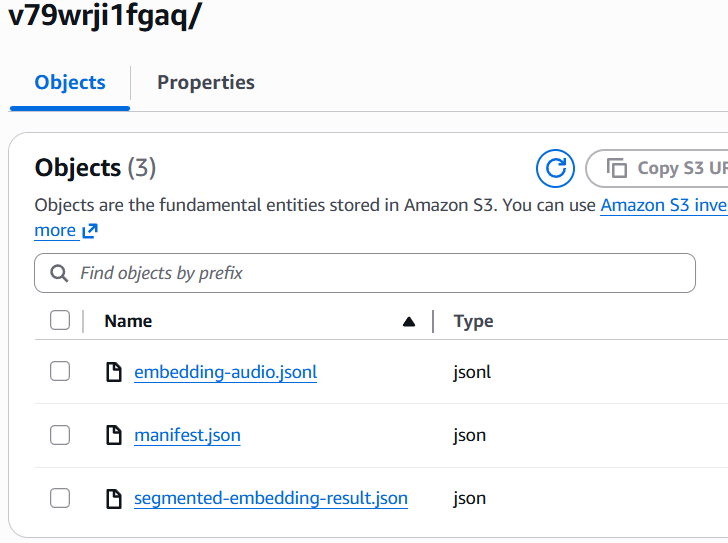
Let’s continue to explore the asyncInvokeBedrockModelAndPutVectorsToS3 method after we started the asynchronous Bedrock model invocation. We create a GetAsyncInvokeRequest object with the invocationArn. Then we use Bedrock Runtime Client to invoke it and get the status from the response. As long as the status is IN_PROGRESS, we take a pause for 20 seconds and repeat our GetAsyncInvokeRequest request until we get the status COMPLETED. In such a case, we are ready to fetch its results from the s3Uri from the GetAsyncInvokeResponse. This is how the output looks for each result of the asynchronous Bedrock model invocation response:
Retrieval of the created audio segmented embeddings
To retrieve the created segmented audio embeddings, we need to parse the file with the name embedding-audio.jsonl and split it. For this, we use the regular expression
\r?\n|\r to get the individual embeddings. For the audio duration of a bit more than 90 seconds and a segmentation of 15 seconds, there will be 7 generated embeddings. Then, for each embedding, we convert its representation into the AsyncEmbeddingResponse object. This object contains the embeddings array, status, and segment metadata. To such metadata belong: index number, segment start and end seconds, for example, from the 16th to the 30th second. Then we retrieve embedding for the current AsyncEmbeddingResponse object and store it with the key, which is defined as a composition of the file name and the segment number (which is the value of the variable _i_) in Amazon S3 Vectors using the putVectors method, which is described in part 2. Below is the complete source code of the asyncInvokeBedrockModelAndPutVectorsToS3 method:
To test creating and storing the audio embeddings, we can uncomment this invocation in the main method.
Create and store video embeddings
Creating and storing the video embeddings is very similar to the procedure described for the audio embeddings. So we’ll only describe the differences.
For demo purposes, I converted the official AWS video about AWS Lambda function into an .mp4 file with the name defined in private VIDEO_NAMES = { “AWS-Lambda-explained-in-90-seconds-video” } and uploaded it into the S3 bucket defined as private final static String S3_BUCKET = “s3://vk-amazon-nova-2-mme/” (please use your unique bucket name for it).
As the duration of this video file is longer than 15 seconds (more than 90 seconds), we need to use the asynchronous Bedrock API. This asynchronous API splits the video into 15-second parts and creates embeddings for each. The relevant part is in the method createAndStoreVideoEmbeddings:
Prepare a video document
Let’s look at what’s happening here. First, in the prepareVideoDocument method, we use software.amazon.awssdk.core.document.Document API to create a JSON request for creating audio embedding. We set taskType as SEGMENTED_EMBEDDING (because we split the video file), durationSeconds of the segmentationConfig to 15 seconds. Then we set embeddingPurpose as GENERIC_INDEX and embeddingDimension as 384 (you can use 4 dimension sizes to trade-off embedding accuracy and vector storage cost: 3072, 1024, 384, and 256). Then we define the video file format as mp4, embeddingMode as AUDIO_VIDEO_COMBINED. At the end, we define the source and its s3Location of our video file. For the complete embeddings request and response schema, I refer to the following article. Below is the complete source code of this method:
The generated Document looks like this:
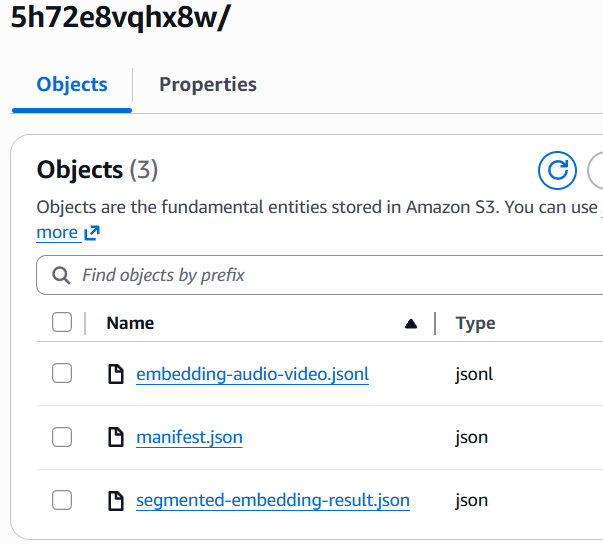
Everything else works the same as in the audio embeddings case described above. The only additional difference for creating video embeddings is how the output looks for each result of the asynchronous Bedrock model invocation response. Please pay attention to the names of the files:
We retrieve all generated video embeddings from the file embedding-audio-video.jsonl, parse them individually, and create the embeddings in the Amazon S3 Vectors. See the above-described asyncInvokeBedrockModelAndPutVectorsToS3 method.
To test creating and storing the audio embeddings, we can uncomment this invocation in the main method.
Conclusion
In this part, we covered creating audio and video embeddings with Amazon Nova 2 Multimodal Embeddings and storing them in Amazon S3 Vectors using AWS Java SDK. In the next part of the series, we’ll take a look at the similarity search across all (text, image, audio, and video) created embeddings.
If you like my content, please follow me on GitHub and give my repositories a star!