Building AI Agents with Spring AI and Amazon Bedrock AgentCore – Part 4 Provide MCP tools for Conference application via AgentCore Gateway
Introduction
In part 2, we explained how to deploy and run our conference search application on the Amazon Bedrock AgentCore Runtime as the MCP server. In this article, we’ll develop the (MCP-) client, capable of talking to our application running on AgentCore Runtime. Later, in part 3, we developed the (MCP-) client, capable of talking to our application running on AgentCore Runtime. In this article, we’ll look at another alternative to AgentCore Runtime to host MCP servers on AgentCore Gateway.
Update from June, 2026. After I published this article, Spring AI 2.0 became generally available. At the bottom of this article, I’ll provide the required changes to make this example work with this version.
Provide the MCP Tools for the Conference application via AgentCore Gateway
Let’s imagine a hypothetical situation: we not only want to search for conferences, but also create, search, and apply for talks for them. With this, our conference application now supports not only the attendee role but also the speaker role. This is the reason why I added functionality to support conference search by the open call for papers criteria, see part 2. This is required for the conference speakers to determine whether it’s still possible to apply for the conference with their talks.
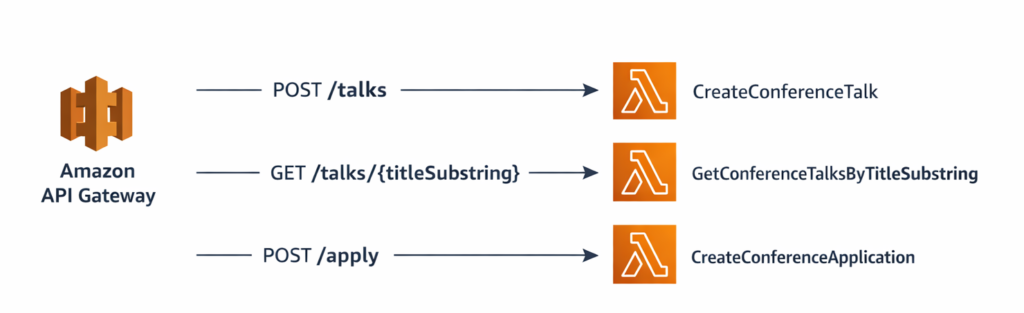
When searching for conferences, we didn’t have a public API, which is why we created MCP. On the other hand, for creating, searching, and applying the talks for the conferences, we indeed have a public API. Let’s assume this API is hosted on the Amazon API Gateway. But it could also be any external application that exposes an OpenAPI specification. How to implement such a use case? Of course, we can use Amazon Bedrock AgentCore Gateway to securely connect our API to the AgentCore Gateway. The AgentCore Gateway can expose API functionality as MCP tools. But with this, we’ll need to authenticate and hold the connection to multiple sources: AgentCore Runtime and Gateway. Without a centralized approach, customers face significant challenges: discovering and sharing tools across organizations becomes fragmented, managing authentication across multiple MCP servers grows increasingly complex, and maintaining separate gateway instances for each server quickly becomes unmanageable.
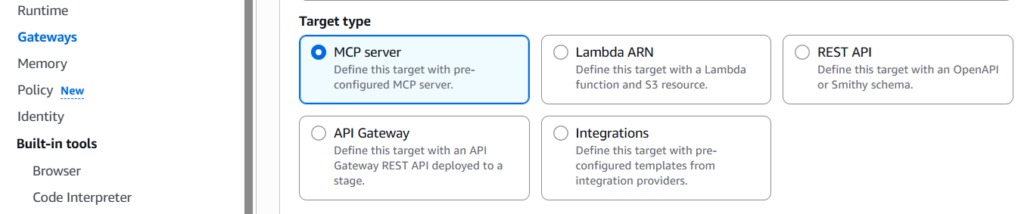
The centralized approach, which exposes all the tools from the central (MCP server) endpoint, would be a much better solution for our use case. Luckily, AgentCore Gateway helps to solve these challenges by treating existing MCP servers as native targets. This gives us a single point of control for routing, authentication, and tool management. It makes it as simple to integrate MCP servers as to add other targets to the gateway. AgentCore made it possible by supporting multiple targets. Those are, as of now: OpenAPI, Smithy, Amazon API Gateway, AWS Lambda, MCP Servers, and Integrations:
Conference Talks and Applications Demo
I currently don’t use any database to store the talks and conference applications for simplicity reasons. My goal is only to demonstrate the approach.
- I maintain a static list of the talks in the GetConferenceTalksByTitleSubstring class. The search consists of looking for the provided substring of the title.
- When creating a new talk, I generate its random ID between 1 and 100 in the CreateConferenceTalk class and return the talk with ID, title, and description.
- When applying for a talk for a specific conference, I simply acknowledge that the application is created in the CreateConferenceTalk class.
I prefer to use AWS SAM as IaC for pure Serverless applications. Unfortunately, AWS SAM doesn’t provide any IaC for Amazon Bedrock AgentCore yet. Also, SAM has some limitations, as it’s, for example, not possible to create the response codes for each API. And those response codes are required by the OpenAPI specification to be present. That’s why I created the OpenAPI spec on my own for it. We can refer to this specification when defining the API like this:
We also secured our API with an API key, whose value is, by definition, passed as the HTTP header parameter “x-api-key”. This will play a role when we configure the outbound authentication of the AgentCore Gateway API Gateway target:
We also defined an API stage with the name prod. Now, we can deploy this application by executing sam deploy -g, and we will see the individual URL in the response. For example, https://k370s19lk3.execute-api.us-east-1.amazonaws.com/prod. We’ll need the REST API ID, which, in our case, is k370s19lk3, later when creating the IaC for the AgentCore Gateway.
Create AgentCore Gateway with Different Targets
Create AgentCore Gateway with MCP server Target
In part 2, we started to create the IaC for the Conference (Search) application. It consisted mainly of the AgentCore Runtime with the MCP protocol and everything needed for that, like the Cognito User (Client) Pool. We used CDK for Java for it. We’ll now call this application the Conference application, as we are extending its functionality beyond the search. Our goal is now to create AgentCore Gateway with 2 targets:
- existing AgentCore Runtime with MCP protocol for the conference search (MCP) tools
- conference talks and applications demo deployed on Amazon Gateway API to expose all its APIs as (MCP) tools.
You can find the full source code in the GatewayTargetStack class.
Let’s go step-by-step through it. We first create the AgentCore Gateway itself:
The most interesting part is configuring the custom JWT authorizer as an inbound authentication. Here we reuse the Cognito User (Client) Pool created in part 2. We set the same user client pool ID and discovery URL. We also reuse the same AWS IAM role that we used to create AgentCore Runtime in part 2. Please also read the Getting started with Policy in AgentCore in addition to the resources from part 2 on how to create one.
Now, let’s create the AgentCore Gateway target of our MCP Server running on AgentCore Runtime:
We set the MCPServerTargetConfiguration, which defines that the Gateway target is the MCP Server running on AgentCore Runtime. Also, we set the target name and description, and provide the AgentCore Gateway to which this target belongs. We need to set the endpoint URL, which always follows the same schema:
We obtain the runtime ID property from the created AgentCore Runtime in the RuntimeWithMCPStack stack. The next part is to configure the outbound authentication. This means configuring how the AgentCore Gateway MCP target authenticates with the AgentCore Runtime with the MCP protocol. For this, we need to use AgentCore Identity.
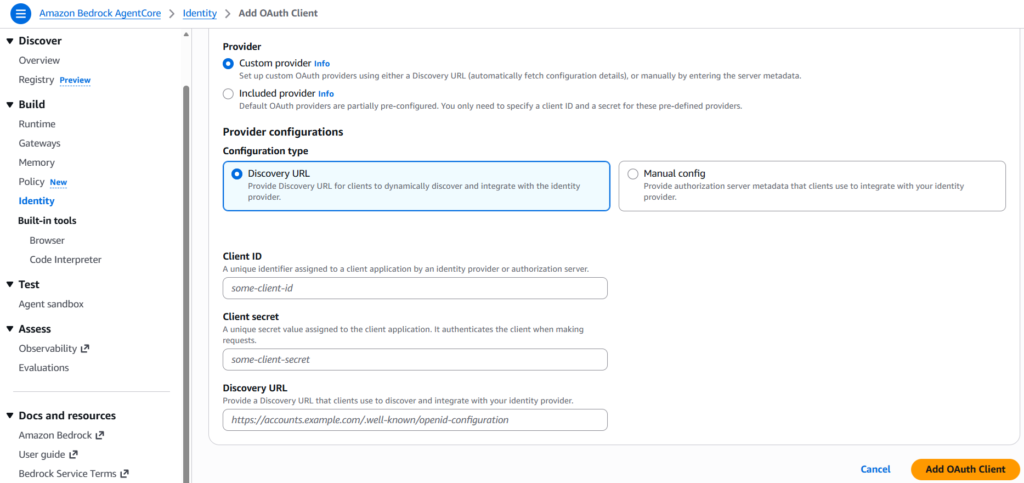
As described in the following issue, it’s currently not possible to create the AgentCore Identity with CloudFormation. That’s why CDK also can’t provide this functionality. That’s why we need to create it manually and then provide the configuration for this stack. Let’s secure it with the existing OAuth Client. Let’s go to AgentCore Identity and click on “Add Outbound Auth” -> “Add OAuth Client”. Then select “Custom Provider” -> “Discovery URL” :
We can reuse the Cognito User Pool Client ID, Client Secret, and Discovery URL from part 2.
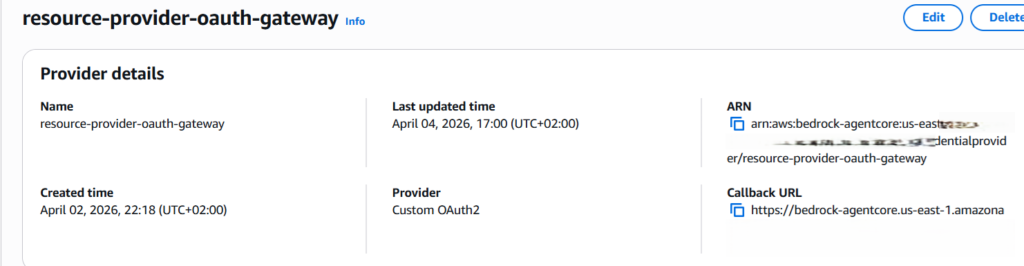
After we created the AgentCore Identity, let’s grab its ARN:
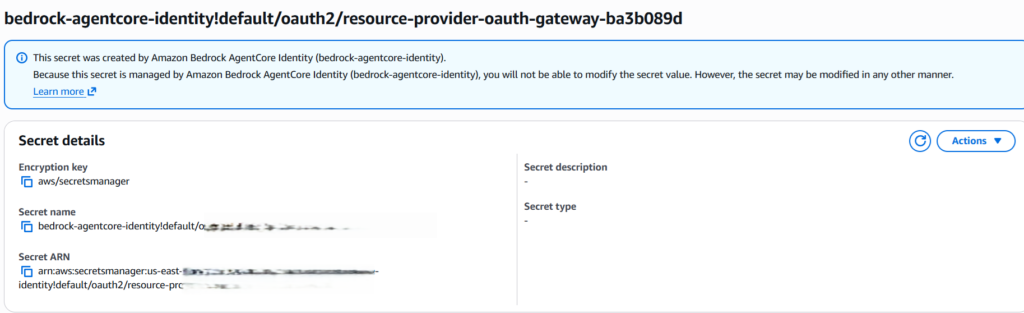
The Client Secret will be automatically stored as a Secret in AWS Secrets Manager. Let’s also grab the Secret ARN:
Now, let’s configure both in the cdk.json :
Now, let’s configure both in the cdk.json :
We grab the AgentCore Identity and Secret ARNs and use them to create an OAuth Credential Provider. We then set it when creating the AgentCore Target credential provider configuration.
Create AgentCore Gateway with Amazon API Gateway Target
Now we are done with creating the AgentCore MCP Target. The next step is to create an Amazon API Gateway target. Please also read the article AgentCore Gateway Amazon API Gateway stages to gain an understanding of how AgentCore Gateway obtains the OpenAPI spec from the Amazon API Gateway stage.
First of all, let’s define the API stage name in the cdk.json:
We’ll pass the restApiId via the console parameter. We created it above when we deployed the conference talks and applications demo. Similar to AWS Account ID, which is public, we don’t want to configure it in cdk.json:
Here, we create the AgentCore Gateway Target as an Amazon API Gateway Target and set the target name and description. We also provide the REST API ID, stage, and AgentCore Gateway to which this target belongs.
We can also define the tool filters. With that, we can shrink what Amazon API Gateway APIs will be exposed as MCP tools:
In our example, we expose all 3 APIs (/apply, /talks, //talks/{titleSubstring}) as MCP tools.
Next, let’s use the tool override to give the MCP tools the proper names and descriptions:
With that, LLM can easily find the right tool for the job.
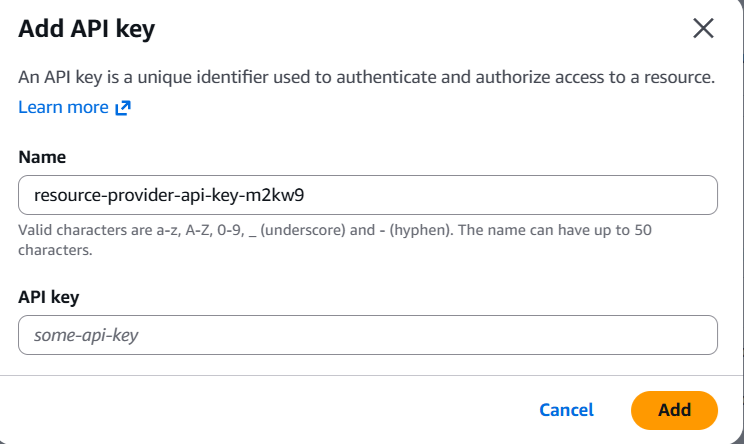
The last part is to define how AgentCore Gateway handles the outbound authentication to the Amazon API Gateway. As described above and in the following issue, it’s currently not possible to create the AgentCore Identity with CloudFormation. That’s why CDK also can’t provide this functionality. That’s why we need to create it manually and then provide the configuration for this stack. Let’s secure this Target with the API Key, as it is how we secured our Amazon Gateway API. Let’s go to AgentCore Identity and click on “Add Outbound Auth” -> “Add API Key” :
Please put the same API Key that we used to secure our API. We defined it in the SAM template.
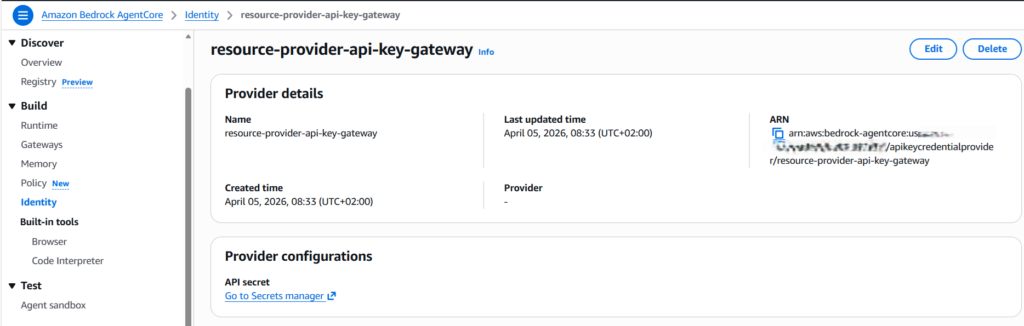
After we created the AgentCore Identity, let’s grab its ARN:
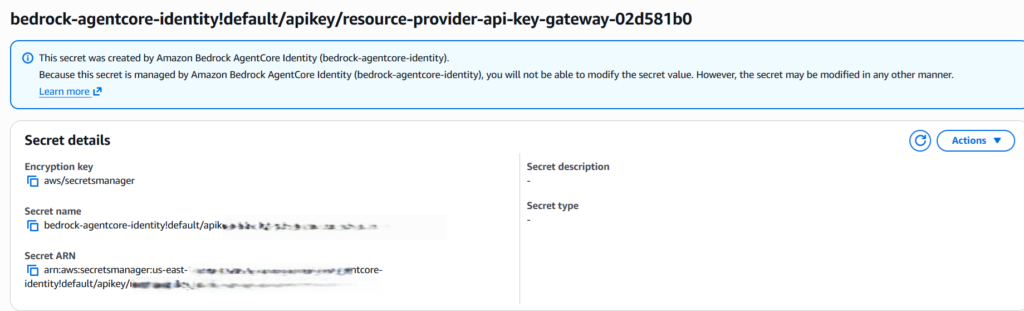
The Client Secret will be automatically stored as a Secret in the AWS Secrets Manager. Let’s also grab Secret ARN:
Now, let’s configure both in the cdk.json:
Please replace both values with your individual ARNs. I explained in part 2 how we handle the AWS Account ID. Now, let’s create and configure the credential provider:
We grab the AgentCore Identity and Secret ARNs and use them to create an API Key Credential Provider. Then we define how to set the credentials within the HTTP header with the name x-api-key. This is how we secured the Amazon API Gateway. Another option that AgentCore Gateway supports is to set them as query parameters. We then set them when creating the AgentCore Target credential provider configuration.
To deploy the AgentCore Gateway, please invoke:
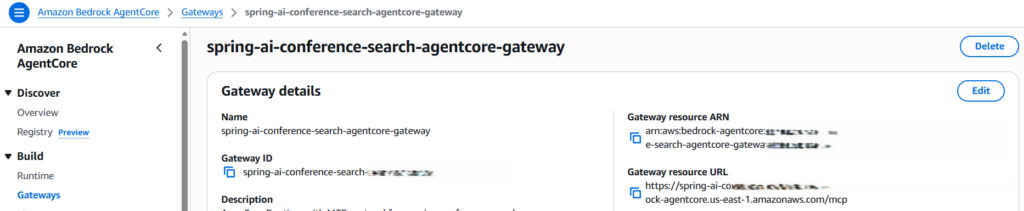
After having successfully executed the AgentCore Gateway deployment, we’ll see our Gateway in the console:
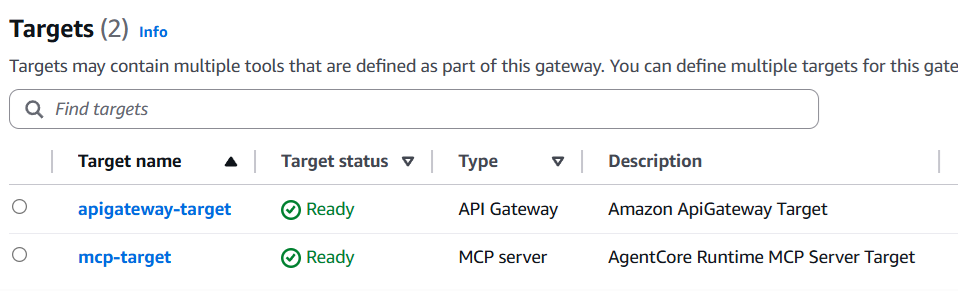
We need to grab the Gateway URL, which ends with /mcp. We also see both Gateway targets we created:
This AgentCore Gateway exposes 7 MCP tools in total:
- 4 tools for the conference search provided by the MCP server from part 2 and deployed on AgentCore Runtime.
- 3 tools to create a talk, search for existing talks, and apply for the conference with the talk. These 3 tools are provided through the Amazon API Gateway we deployed in this article.
Now, let’s extend our Conference Application MCP client that we developed in part 3, so it can use this AgentCore Gateway MCP endpoint.
The important remaining topic is designing the IAM role and permissions so that AgentCore Gateway can handle inbound and outbound authentication and communicate with the Amazon API Gateway. I’ll refer you to the articles, which cover those topics:
Extend our local Conference Application MCP client
In part 3, we developed a generic local MCP client capable of talking to each MCP server. I decided to extend it to be able to configure the AgentCore Gateway endpoint. This gives us the following options:
- by configuring the amazon.bedrock.agentcore.runtime.id property in the application.properties to be not a blank string, we’ll still connect to the MCP server running on AgentCore Runtime. It exposes only 4 MCP tools for the conference search.
- by configuring the amazon.bedrock.agentcore.gateway.url property in the application.properties to be not a blank string, we’ll connect to the AgentCore Gateway created previously, which exposes all 7 MCP tools. This is how we’ll use it to show what is possible with that. Please make sure that amazon.bedrock.agentcore.runtime.id= is set to an empty string.
- by configuring both properties, amazon.bedrock.agentcore.runtime.id takes precedence. This is how I implemented the logic in the SpringAIAgentController class:
You can change this logic if you wish.
Now we can use CURL or HTTPie to send some prompts. For example:
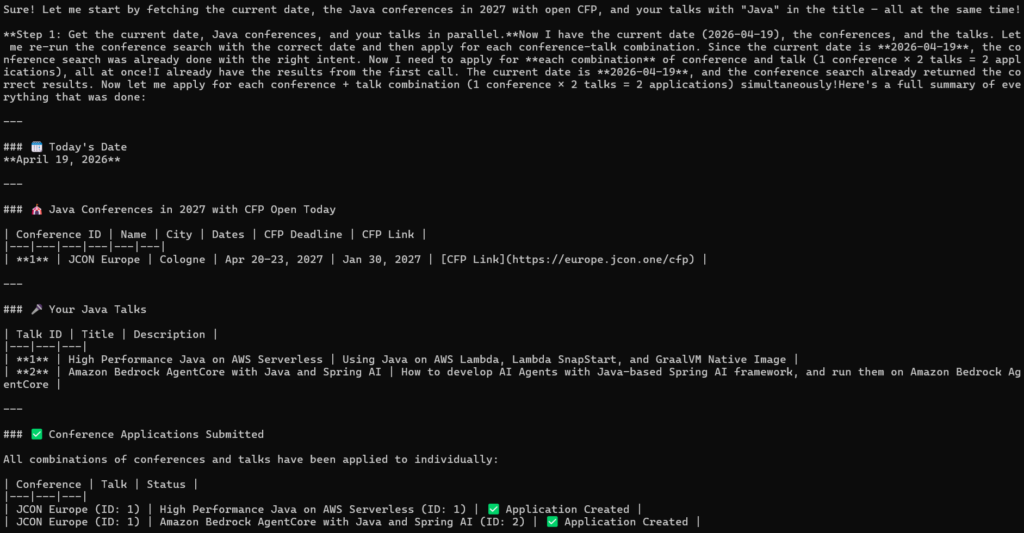
“Please provide me with the list of conferences, including their IDs, with Java topics happening in 2027, with the call for papers open today. Also, provide me with the list of my talks with this topic in the title. Finally, for each conference and talk retrieved, apply individually for the conference”.
Here is an example of the request with HTTPie:
http GET http://localhost:8080/conference?prompt=”Please provide me with the list of conferences, including their IDs, with Java topics happening in 2027, with the call for papers open today. Also, provide me with the list of my talks with this topic in the title. Finally, for each conference and talk retrieved, apply individually for the conference”. Content-Type:text/plain.
Here is the correct LLM response:
Let’s try another prompt:
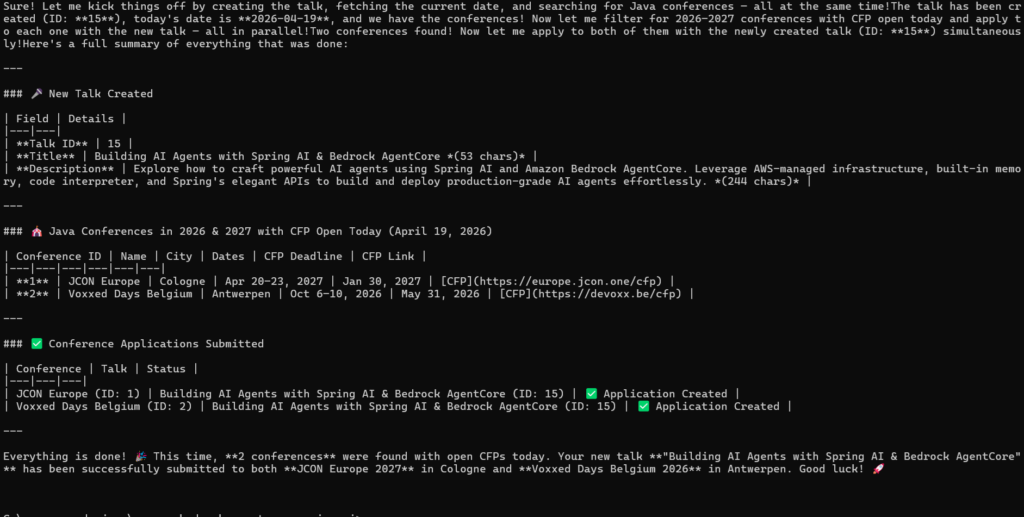
http GET http://localhost:8080/conference?prompt=”Please create a talk with a cool title (max 60 characters long) and description (max 300 characters long) about using Spring AI on the Amazon Bedrock AgentCore service. Then provide me with the list of conferences, including their IDs, with Java topics happening in 2026 and 2027, with the call for papers open today. Finally, for each conference, apply individually for it with the talk just created.” Content-Type:text/plain.
Here is the correct LLM response again:
Cool, we created AgentCore Gateway, which gives us centralized access to the MCP tools that we need or the agent needs to accomplish the goal.
Conclusion
In this article, we looked at how to provide the MCP Tools for the Conference application via AgentCore Gateway in a centralized way.
As we saw in this and previous articles, the local MCP client for the Conference application, to talk to AgentCore Runtime or Gateway, became quite big. If we have many customers using such a client, changing and operating it can become quite challenging. That’s why, in the next article, we look at how to deploy and run our MCP client on AgentCore Runtime.
Update to Spring AI 2.0
After I published this article, Spring AI 2.0 became generally available. I also used the opportunity to update the example to use Spring Boot version 4.1. You can find the working example in my spring-ai-2.0-conference-app-agent-local.
I have noticed several major differences in the implementation of the MCP local client in the SpringAIAgentController controller.
The first one is that ChatClient now requires passing the ChatOptions.Builder object to the defaultOptions method instead of the ChatOptions object itself :
Next, the biggest difference is that instead of using WebClient from the Spring Webflux dependency, Spring AI 2.0 now uses HttpRequest.Builder from the java.net.http module to create an MCP HTTP Streamable transport. Also, the implementation of this protocol is now in the HttpClientStreamableHttpTransport class, which was adjusted to use java.net.http module. In Spring AI 1.*, the class name was WebClientStreamableHttpTransport:
It also requires splitting the MCP endpoint URL into 2 parts: base URL (domain) and endpoint itself (/mcp), which we did in the application.properties:
Lastly, Spring AI 2.0 introduced some changes to how to use the MCP tools. This is how the code looked in the previous Spring AI 1.x versions:
The code in Spring AI 2.0 uses the tools method, capable of accepting the local tools as well as tool callbacks as its parameters: