Serverless applications on AWS with Lambda using Java 25, API Gateway and DynamoDB – Part 6 Using GraalVM Native Image
Introduction
In part 1, we introduced our sample application. In parts 2-5, we measured Lambda function performance using different approaches:
- without activation of Lambda SnapStart
- with activation of Lambda SnapStart, but without using any priming techniques
- with activation of Lambda SnapStart and using different priming techniques
We observed that by enabling SnapStart and applying different priming techniques, we could significantly further reduce the Lambda cold start times. It’s especially noticeable when looking at the “last 70” measurements with the snapshot tiered cache effect. Moreover, we could significantly reduce the maximal value for the Lambda warm start times.
In this article, we’ll introduce another approach to improve the performance of the Lambda function: GraalVM Native Image.
GraalVM Native Image
Sample application using GraalVM Native Image
We’ll reuse the sample application from part 1, but adjust it. The goal is to be able to build a GraalVM Native Image and deploy it on AWS Lambda as a Custom Runtime.
Here is the final version of the aws-lambda-java-25-dynamodb-as-graalvm-native-image application.
Let’s go step-by-step through the changes compared to the initial application from part 1. The business logic (Entity, ProductDao, and the Lambda handlers) remains completely the same. All we need to do is make the changes in the pom.xml, AWS SAM template, and provide additional GraalVM configuration.
Making sample application GraalVM Native Image capable
For our sample application to run as a GraalVM Native Image, we need to declare all classes whose objects will be instantiated by reflection. These classes need to be known by the AOT compiler at compile time. This happens in reflect-config.json. As we can see, we need to declare the following:
- all our Lambda functions like GetProductByIdHandler and CreateProductHandler
- entities like Product that Jackson converts from JSON payload and back
- APIGatewayProxyRequestEvent and all its inner classes because we declared this event type as a request event in our Lambda functions, like GetProductByIdHandler and CreateProductHandler
- org.joda.time.DateTime, which will be used to convert a timestamp from a string and back. Such a timestamp is a part of the API Gateway proxy request and response events. In my opinion, it’s time to switch from Joda-Time to the Java Date/Time API for this.
There are multiple ways, how, and where to define GraalVM Native configuration, like reflection configuration. For this, I refer you to the article Build a Native Executable with Reflection.
To avoid errors with Loggers during the initialization described in the article Class Initialization in Native Image, we need to add GraalVM Native Image build arguments in the native-image.properties :
We should place the native-image.properties file in the META-INF/native-image/$ {MavenGroupIid}/$ MavenArtifactId}.
As we use slf4j-simple as the logger in our application, we need to place native-image.properties in the path META-INF/native-image/org.slf4j/slf4j-simple. If you use another Logger implementation (e.g., log4j or logback), you need to adjust this file and place it accordingly.
To save the manual work of defining all this metadata, you can use the GraalVM Tracing Agent to generate it for you.
Lambda Custom Runtime
There is no managed GraalVM (Native Image) on AWS Lambda. To deploy the native image on AWS Lambda, we need a custom runtime. For this, we need to package everything into a file with a .zip extension, which includes the file named bootstrap. This file can either be the GraalVM Native Image or contain instructions on how to invoke the GraalVM Native Image placed in another file. We’ll use the latter way; let’s explore it.
Building GraalVM Native Image
We’ll build GraalVM Native Image automatically in the package phase, which we defined in the pom.xml. This is how we configured the relevant part:
We use the native-image-maven-plugin from org.graalvm.nativeimage tools and execute native-image in the package phase. You can also use the alternative native-maven-plugin plugin, whose configuration is very similar. This plugin requires the definition of the main class, which a Lambda function doesn’t have. That’s why we use Lambda Runtime GraalVM and define its main class com.formkiq.lambda.runtime.graalvm.LambdaRuntime. Lambda Runtime GraalVM is a Java library that makes it easy to convert AWS Lambda written in the Java programming language to GraalVM. We defined it previously in pom.xml as a dependency:
We then give the native image name aws-lambda-java-25-with-dynamodb-as-graalvm-native-image (the default one will also be an artifact name). After that, we include some GraalVM Native Image arguments and the previously defined reflect-config:
To zip the built GraalVM Native Image as function.zip required by Lambda Custom Runtime, we use the maven-assembly plugin:
The finalName is the name of the zip file; in our case, function. We also include the native.xml descriptor:
This descriptor defines which files from which directories, with which permissions, will be added to the zip as an assembly format. fileMode equal to 0775 means it has permission to be executable on the Linux operating system. We include the previously built GraalVM Native Image with the name aws-lambda-java-25-with-dynamodb-as-graalvm-native-image there. We also include the already defined bootstrap file, which basically invokes the GraalVM Native Image :
In the end, we have to build GraalVM Native Image packaged as a zip file, which can be built as a Lambda Custom Runtime with mvn clean package.
Deploying GraalVM Native Image as a Lambda Custom Runtime
In the AWS SAM template, we set the Lambda runtime as provided.al2023, which is the newest version of the custom runtime, and provide the path to the previously built GraalVM Native Image as target/function.zip.
Now we are ready to deploy our application with sam deploy -g.
Measurements of cold and warm start times of our application using GraalVM Native Image
We’ll measure the performance of the GetProductById Lambda function mapped to the GetProductByIdHandler. We will trigger it by invoking curl -H “X-API-Key: a6ZbcDefQW12BN56WEVDDBGVNI25” https://{$API_GATEWAY_URL}/prod/products/1.
We designed the experiment exactly as described in part 2.
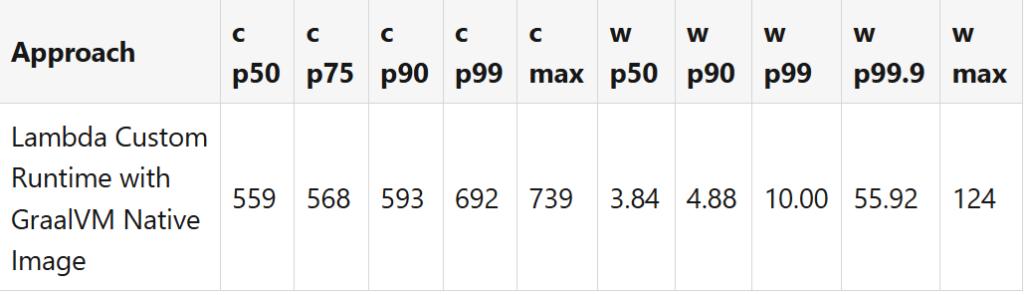
I did the measurements with provided:al2023.v124 version, and the deployed artifact size of this application was 25.186 KB.
Conclusion
In this part of the series, we first introduced GraalVM Native Image. Then we explained step-by-step how to convert the sample application to one where the native image can be built. When we deployed the native image on AWS Lambda using the Lambda Custom Runtime. Finally, we measured the performance of the Lambda function. We observed that the cold and warm start times were lower compared to using Lambda SnapStart, even with priming techniques; see the measurements table in part 5. On the other hand, creating a Native Image is not for free, as we need to scale the CI/CD pipeline to build a native image. Building it requires many GBs of memory, and the process takes many minutes depending on the hardware. Creating a full set of the Native Image metadata, even using GraalVM Tracing Agent, means introducing additional complexity. Lambda SnapStart, on the other hand, is fully managed.
We’ll compare both approaches in one of the next articles.
Please also watch out for another series where I use a relational serverless Amazon Aurora DSQL database and additionally the Hibernate ORM framework instead of DynamoDB to do the same Lambda performance measurements.