Serverless applications on AWS with Lambda using Java 25, API Gateway and DynamoDB – Part 9 Using Container Image with SnapStart and priming approaches
Introduction
In part 8 of the series, we learned how to convert the sample application to one using a container image as a deployment artifact on AWS Lambda and measured the performance of the Lambda functions. We observed that the Lambda cold start times are quite high.
In this part, we’ll enable SnapStart on the Lambda functions using a container image. We’ll also apply priming techniques and measure the performance of the Lambda functions for all scenarios.
You can find the final version of our sample application in the same aws-lambda-java-25-dynamodb-as-container-image GitHub repository, which we can deploy on AWS Lambda as a container image. Besides the previous part, please read the following articles in this series to grasp the general concepts:
The business logic required to implement the Lambda SnapStart priming approaches and the measurement design is the same. The changes that we need to make for each Lambda function in the SAM template are the same as those we covered in part 8.
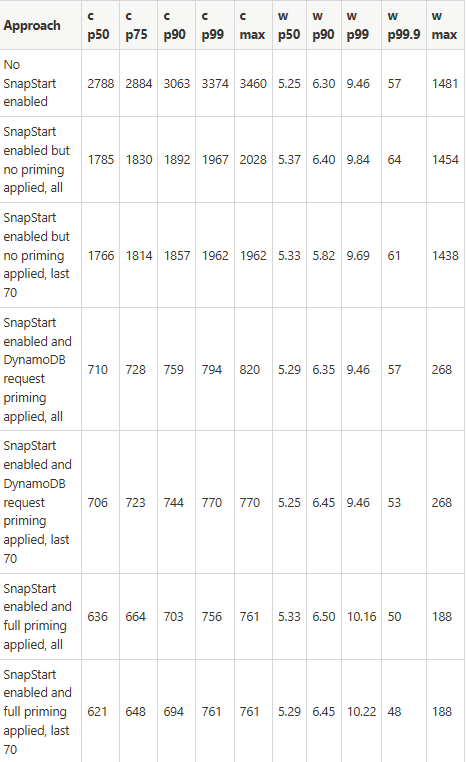
Measurements of cold and warm start times of our application using a Container Image
For the sake of completeness, we provide the measurements for the “No SnapStart enabled” approach from part 8.
Cold (c) and warm (w) start time with -XX:+TieredCompilation -XX:TieredStopAtLevel=1 compilation in ms:
Conclusion
In this part, we enabled SnapStart on the Lambda functions using a container image. We also applied priming techniques and measured the performance of the Lambda functions for all scenarios. What we observe is that both cold and warm start times are very competitive when using the container image. Especially if we compare them to the measurements we did for the Lambda Java 25 managed Lambda runtime. See the results in the article SnapStart and full priming for comparison. I especially look for 90th-percentile measurements where the performance of the Lambda function with a container image is much better. What we also see is that the effect of the snapshot tiered cache is not so strong for the container images (see the last 70 measurements). Yes, with GraalVM Native Image, we have the lowest cold and warm start times. The trade-off is the effort required to create and maintain the images (GraalVM native and Container). For the GraalVM native image, it is quite high; for the container image, it is not.
For the performance-sensitive Lambda functions, using the container image as the packaging format provides a very good solution. This is especially true when enabling Lambda SnapStart, which recently became available, and implementing priming. Please note that SnapStart charges apply to the container images, while SnapStart for supported Java managed versions remains free on AWS Lambda. So, gaining additional performance with SnapStart for container images comes at an additional cost. That’s why choosing a managed Java version versus a container image becomes a cost-performance trade-off.
Please also watch out for another series where I use a relational serverless Amazon Aurora DSQL database and additionally the Hibernate ORM framework instead of DynamoDB to do the same Lambda performance measurements.
If you like my content, please follow me on GitHub and give my repositories a star!