Orchestrating workflows with Amazon S3 Files and AWS Lambda durable functions using Java SDK – Part 3 Waits and callbacks
Introduction
In part 2 of the series, we explored how to use the AWS Lambda Durable Execution SDK for Java to create and execute durable steps synchronously and asynchronously. In this part, we’ll extend our application by adding and implementing wait and callback operations to it.
Sample application with wait for callback
Let’s explore waits and callbacks. We get access to them through DurableContext. Waits are planned pauses where your function stops running and stops charging until it’s time to continue. Use them for time periods, external callbacks, or polling for a condition. Callbacks suspend execution until an external system sends a result. Use this for human approvals, webhooks, or any event-driven workflow. In our sample application, we’ll combine both and use waitForCallback. It simplifies callback handling by combining callback creation and submission in one operation.
I first copied the application that we created in part 2 into the aws-s3-files-lambda-durable-functions-with-wait-for-callback-java-25 repository. We’ll work on it to extend our application. Please go through the content of part 2 to understand the sample application and the basic concepts of Lambda durable functions. We’ll completely reuse the Infrastructure as Code part as well.
Let’s add another, a bit artificial use case to our sample application. After searching for the author’s YouTube videos and upcoming talks, the author should confirm those talks. For this, let’s extend our AsyncAuthorContentExtractor Lambda function and add the following invocation:
Let’s explain step by step what is happening here. We use DurableContext to create the waitForCallback operation. We give it a name and the return type. This return type corresponds to the type of the object that will be passed in the callback. We also provide the submitter function sendApprovalRequest, receiving the callback ID and a StepContext. In this function, we can perform the desired operation, like sending the talk approval request to the author. We won’t implement this functionality but only log the callback ID, which we’ll require later to send the callback. We can optionally pass the WaitForCallbackConfig. In our case, we only set the CallbackConfig with a timeout of 1 hour. This means that if no callback arrives within this period of time, the Lambda durable function will fail. We can also set the StepConfig. Please review part 2 for more information.
When we invoke the waitForCallback method, the invocation will block until the callback arrives. After its arrival, the payload of the callback is deserialized into the object of type UpcomingTalkApprovalStatus, and this object will be returned.
Building, packaging, deploying, and testing our sample application
Now we can build and package our application with mvn clean package and deploy it with sam deploy. The deployment process can take up to 10 minutes because of the creation and mounting of S3 Files.
To test our Lambda durable function, we can navigate to the Lambda service, search for the AsyncAuthorContentExtractor function, and go to the “Test” tab.
We need to pass the following sample JSON Event to it, which represents the author:
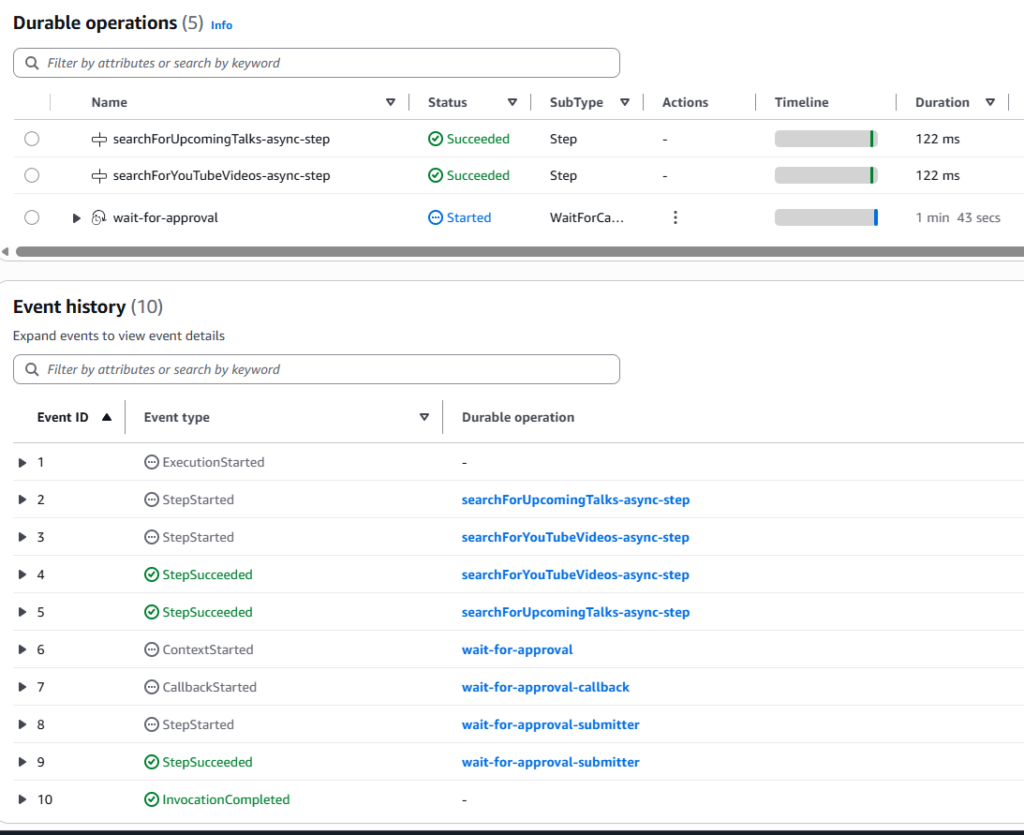
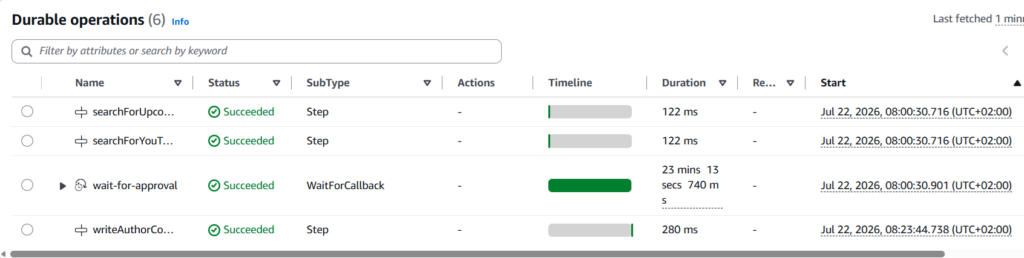
Then we can test it. After that, we go to the “Durable execution” tab and can see all the execution details:
What we see here is that the first 2 steps (searching for YouTube videos and upcoming talks) have already been executed asynchronously. Now, our Lambda function is in the “wait for the approval” state. The invocation of the Lambda durable function is now completed. Why? Because waits suspend our function without incurring charges.
Now let’s send the reply (callback) to our Lambda durable function. We first need to grab the callback ID from the log. There are several ways to send the callback (success or failure). We can use the Lambda CLI send-durable-execution-callback-success or execution-callback-failure commands. Alternatively, we can use the AWS SDK to do the same. Let’s use the AWS Java SDK for it. First, we need to add the following dependency to pom.xml:
First, we need to configure the callback ID (please replace it with your individual one). Then, we create the Lambda client. Next, we invoke its sendDurableExecutionCallbackSuccess method to send the successful callback. We pass the callback ID and payload as JSON. This payload should be deserializable into the object of type UpcomingTalkApprovalStatus (see above). Similarly, we can send the failure callback by using the sendDurableExecutionCallbackFailure operation. Please move this logic with all required dependencies to the service that sends the callbacks. Now let’s send the callback (approximately 23 minutes later) and see what happens:
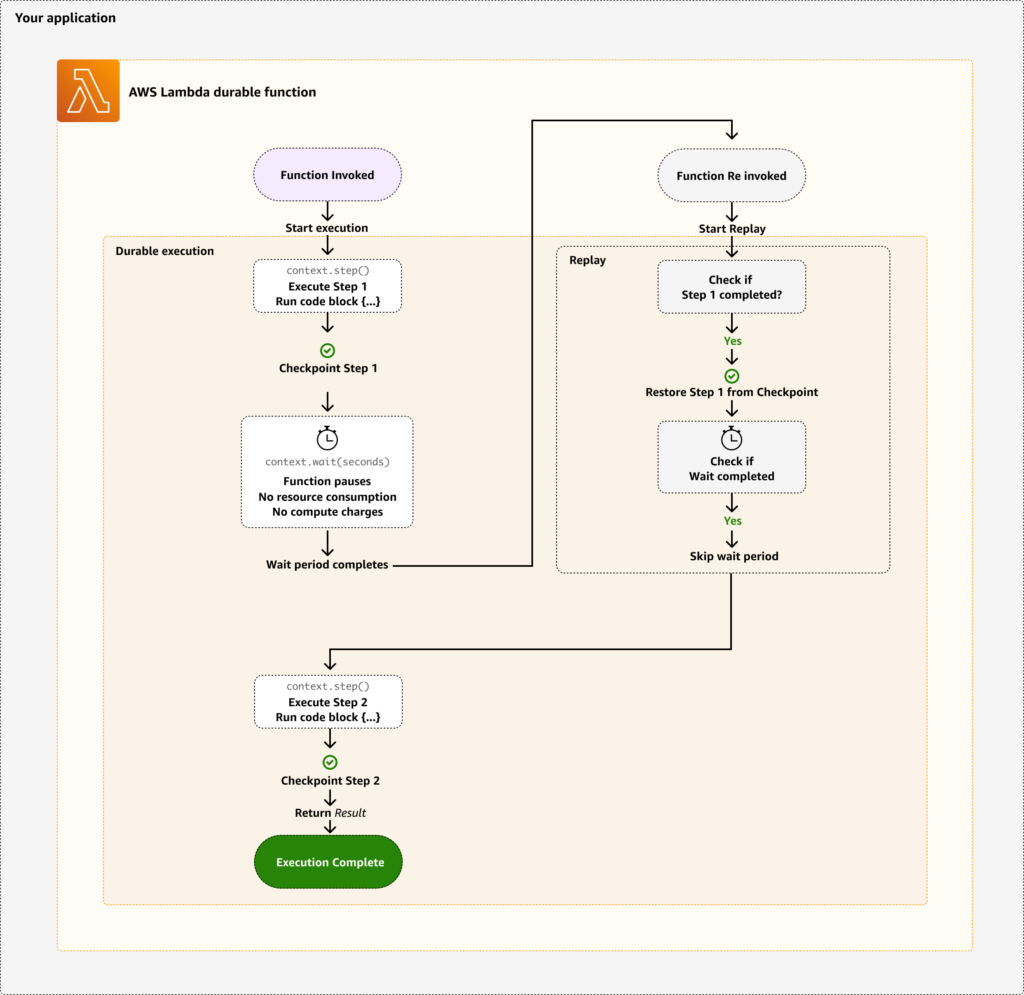
We observe that the callback was successfully received and processed. After it, the last writeAuthorContentToFile-step step was executed as well. But we also observe that execution of our Lambda durable function started from the beginning. What happened here exactly? After our function resumes from a pause or interruption, the system performs replay. During replay, our code runs from the beginning but skips over completed checkpoints, using stored results instead of re-executing completed operations. This replay mechanism ensures consistency while enabling long-running executions.
Here is the picture, which describes the concept that I took from this source:
There are also other individual operations that AWS Lambda Durable Execution SDK for Java supports:
- wait – wait suspends the function and resumes after the specified duration. There is no charge during suspension.
- waitAsync – starts the wait timer but returns a DurableFuture immediately, allowing other operations to run concurrently. The execution only suspends when you call .get() on the future (if the wait hasn’t completed yet).
- createCallback – callbacks suspend execution until an external system sends a result. Use this for human approvals, webhooks, or any event-driven workflow.
Conclusion
In this part of the series, we explored how to use the AWS Lambda Durable Execution SDK for Java to implement wait and callback.
In the next part, we’ll explore the “wait for condition” operation to poll a condition until it’s met. Still, our Lambda durable function itself contains too much business logic. Ideally, it should simply be the orchestrator and contain as little business logic as possible. That’s why, in the subsequent parts, we’ll move the logic for each step into a separate Lambda function. With that, we’ll explore how to invoke another Lambda function within the durable step. We’ll also show how to invoke multiple Lambda functions in parallel.
If you like my content, please follow me on GitHub and give my repositories a star!