Orchestrating workflows with Amazon S3 Files and AWS Lambda durable functions using Java SDK - Part 8

Orchestrating workflows with Amazon S3 Files and AWS Lambda durable functions using Java SDK

Orchestrating workflows with Amazon S3 Files and AWS Lambda durable functions using Java SDK - Part 1

Orchestrating workflows with Amazon S3 Files and AWS Lambda durable functions using Java SDK – Part 1 Introduction to the series and services

Orchestrating workflows with Amazon S3 Files and AWS Lambda durable functions using Java SDK - Part 2

Orchestrating workflows with Amazon S3 Files and AWS Lambda durable functions using Java SDK – Part 2 Durable synchronous and asynchronous steps

Orchestrating workflows with Amazon S3 Files and AWS Lambda durable functions using Java SDK - Part 3

Orchestrating workflows with Amazon S3 Files and AWS Lambda durable functions using Java SDK – Part 3 Waits and callbacks

Orchestrating workflows with Amazon S3 Files and AWS Lambda durable functions using Java SDK - Part 4

Orchestrating workflows with Amazon S3 Files and AWS Lambda durable functions using Java SDK – Part 4 Wait for condition

Orchestrating workflows with Amazon S3 Files and AWS Lambda durable functions using Java SDK - Part 5

Orchestrating workflows with Amazon S3 Files and AWS Lambda durable functions using Java SDK – Part 5 Map and child context

Orchestrating workflows with Amazon S3 Files and AWS Lambda durable functions using Java SDK - Part 6

Orchestrating workflows with Amazon S3 Files and AWS Lambda durable functions using Java SDK – Part 6 Invoke a Lambda function and parallel execution

Orchestrating workflows with Amazon S3 Files and AWS Lambda durable functions using Java SDK - Part 7

Orchestrating workflows with Amazon S3 Files and AWS Lambda durable functions using Java SDK – Part 7 Implement AI Agents with Spring AI and AgentCore Gateway Web Search Tool hosted on AWS Lambda

Orchestrating workflows with Amazon S3 Files and AWS Lambda durable functions using Java SDK - Part 8

Orchestrating workflows with Amazon S3 Files and AWS Lambda durable functions using Java SDK – Part 8 Implement AI Agents with Spring AI and AgentCore Gateway Web Search Tool hosted on AgentCore Runtime

Orchestrating workflows with Amazon S3 Files and AWS Lambda durable functions using Java SDK – Part 8 Implement AI Agents with Spring AI and AgentCore Gateway Web Search Tool hosted on AgentCore Runtime

Introduction

In part 7, we transformed our application into an agentic one. We replaced the search for YouTube and upcoming talks with the AgentCore Gateway Web Search Tool. Also, we used the Spring AI framework to implement the AI agent and AWS Lambda to host it. This might be sufficient for very simple agents, as AWS Lambda has its limitations of a 15-minute execution duration and isn’t very efficient for agents spending a lot of time waiting on I/O.

In this part of the series, we’ll show how to host those AI agents on the Amazon Bedrock AgentCore Runtime instead. AgentCore Runtime provides a secure, serverless, and purpose-built hosting environment for deploying and running AI agents or tools. I wrote an article series about AgentCore Runtime, which I refer to.

There are multiple good articles that highlight the difference between hosting the agents on AWS Lambda vs Amazon Bedrock AgentCore Runtime:

Sample application using AgentCore Gateway Web Search Tool and Spring AI hosted on Amazon Bedrock AgentCore Runtime

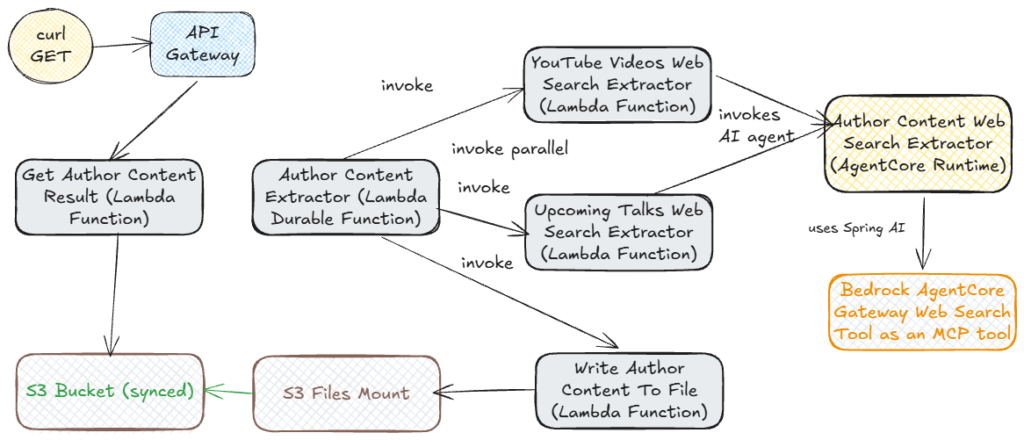
The target architecture of our sample application looks like this:

Sampe application architecture

Instead of hosting the AI Agents for searching for upcoming talks and YouTube videos in the Lambda function, we bundle them and deploy them together on AgentCore Runtime. We expose this agent via the HTTP protocol. In this case, bundling agents works fine. It’s because we can parameterize our prompt to instruct the agent to search either for upcoming talks or for YouTube videos. There are cases where it’s beneficial to have different agents and host them separately (on AgentCore Runtime). We still use a Lambda function per agent to invoke our agent hosted on AgentCore Runtime, using the AWS Java SDK.

You can find the final version of the application in my aws-s3-files-lambda-durable-functions-as-ai-agents-orchestrator-java-25 repository.

Here we find the following :

   default public <T> T search(Author author, String searchTopic, int maxNumberOfResults,
        Class<T> clazz)  throws Exception {
    var payload = """
	       {
	"prompt":"Do a web search for the %s authored by %s %s. Provide maximum %d results. Your response should be in JSON format. Do not include any explanations, only provide a RFC8259 compliant JSON response following this format without deviation.",
	"resultType": "%s"
	       }
       """.formatted(searchTopic, author.firstName(), author.lastName()
	   , maxNumberOfResults, clazz.getName());

      var httpClient=ApacheHttpClient.builder()
         .connectionTimeout(Duration.ofMinutes(5))
         .socketTimeout(Duration.ofMinutes(5))
         .build();
						
     var bedrockAgentCoreClient = BedrockAgentCoreClient.builder()				 
         .region(Region.of(System.getenv("REGION")))
         .httpClient(httpClient)
         .build();

     var AGENT_RUNTIME_ARN= System.getenv("AGENTCORE_RUNTIME_ARN");
			
     var invokeAgentRuntimeRequest = InvokeAgentRuntimeRequest.builder()
          .agentRuntimeArn(AGENT_RUNTIME_ARN)				 				           
          .qualifier("DEFAULT")
          .contentType("application/json")
          .payload(SdkBytes.fromUtf8String(payload))
          .build();
			
     try (var responseStream = bedrockAgentCoreClient.invokeAgentRuntime(invokeAgentRuntimeRequest)) {

      var response = new String(responseStream.readAllBytes(), StandardCharsets.UTF_8);
      return OBJECT_MAPPER.readValue(response, clazz);
     }
}

First, we parameterize the prompt by providing:

  • the search topic (YouTube videos or upcoming talks)
  • content author first and last name
  • maximum number of results
  • the result type (YouTubeVideos.class or UpcomingTalks.class depending on the search topic).

Next, we use the AWS Java SDK to create an InvokeAgentRuntimeRequest with the constructed prompt and AgentCore Runtime ARN, which we retrieve from an environment variable AGENTCORE_RUNTIME_ARN. We set the value of this variable in the AWS SAM template. This value should correspond to the Runtime ARN we created in the IaC part described earlier. Here is an example of how to do it for the YouTubeVideosExtractorFunction Lambda function:

 YouTubeVideosExtractorFunction:
    Type: AWS::Serverless::Function
    Properties:
      FunctionName: YouTubeVideosAIAgentExtractor
      Handler: dev.vkazulkin.handler.YouTubeVideosExtractor::handleRequest
      Environment:
        Variables:
          AGENTCORE_RUNTIME_ARN: !Sub arn:aws:bedrock-agentcore:${AWS::Region}:${AWS::AccountId}:runtime/RuntimeForAuthorContentAgenticSearch-LBaMJZGabnk
      Policies:
          - Version: '2012-10-17'
            Statement:
              - Sid: InvokeRuntime
                Effect: Allow
                Action:
                  - bedrock-agentcore:*Runtime*
                  - bedrock-agentcore:*WorkloadIdentity
                  - bedrock-agentcore:*CredentialProvider
                  - bedrock-agentcore:*Token*
                  - bedrock-agentcore:*Access*
                Resource: 'arn:aws:bedrock-agentcore:*:*:*runtime*'

We also need to give this Lambda function permissions to invoke the AgentCore Runtime. We have to do the same for the UpcomingTalksExtractorFunction Lambda function as well. After that, create a BedrockAgentCoreClient client to execute this request. Lastly, we convert an LLM response in JSON format to the specified result type and return it.

Once again, I gave a detailed explanation of this step in my article Deploy MCP client for Conference application on AgentCore Runtime.

Building, packaging, deploying, and testing our sample application

Now we can build and package our application with mvn clean package and deploy it with sam deploy. The deployment process can take up to 10 minutes because of the creation and mounting of S3 Files. Please follow the steps from part 7 to test the application, as they are exactly the same. Our Lambda durable function executes exactly the same steps, so the output will be the same. The only difference is that I renamed the Lambda Durable function in this project to AuthorContentExtractorAIAgentsOrchestrator.

Conclusion

In this part of the series, we showed how to host AI agents, which our Lambda durable function orchestrates, on the AgentCore Runtime.

If you like my content, please follow me on GitHub and give my repositories a star!
Orchestrating workflows with Amazon S3 Files and AWS Lambda durable functions using Java SDK

Orchestrating workflows with Amazon S3 Files and AWS Lambda durable functions using Java SDK – Part 7 Implement AI Agents with Spring AI and AgentCore Gateway Web Search Tool hosted on AWS Lambda