Orchestrating workflows with Amazon S3 Files and AWS Lambda durable functions using Java SDK – Part 7 Implement AI Agents with Spring AI and AgentCore Gateway Web Search Tool hosted on AWS Lambda
Introduction
In part 6 of the series, we moved the logic associated with each step into a separate Lambda function. We explored how to invoke another Lambda function within the durable step. Also, we showed how to invoke multiple Lambda functions in parallel.
In this article, we’ll transform our application into an agentic one. Currently, the search for YouTube and upcoming talks returns static content. We’ll replace it with the Amazon Bedrock AgentCore Gateway Web Search Tool. As it’s exposed via MCP, we need an MCP client to connect to it. For that, we’ll use the Spring AI framework. First, we still use AWS Lambda to host the AI agents. In later parts, we’ll show how to host those AI agents on Amazon Bedrock AgentCore Runtime instead.
The question is whether it’d be appropriate to host our AI agents on AWS Lambda. Our agents are really simple and return a constant amount of data. They also have nearly constant context size. We don’t need the flexibility of Firecracker, including the ability to grow and shrink the CPU and memory usage of VMs in place. Also, our agents are stateless, so we don’t need the AgentCore support for stateful streamable-HTTP MCP servers. For such agents, it’s feasible to host them on AWS Lambda.
Introduction to Spring AI framework
How to convert AWS Lambda to a Spring (Boot) Application
I’ve written another article series about Spring Boot 3.4 applications on AWS Lambda, where I introduced 3 approaches to convert AWS Lambda to a Spring (Boot) Application :
In this article, I’ll go for AWS Serverless Java Container for Spring Boot.
Sample application using AgentCore Gateway Web Search Tool and Spring AI hosted on AWS Lambda
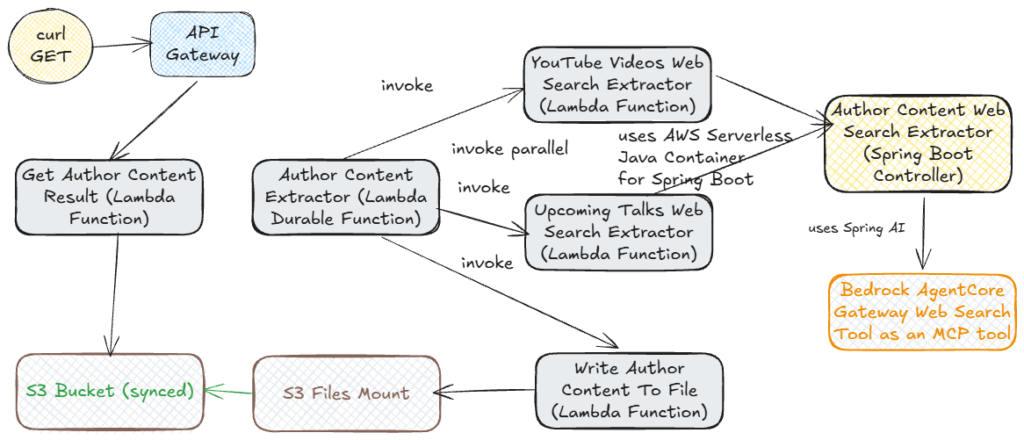
The target architecture of our sample application looks like this:
I first copied the application that we created in part 6 into the aws-s3-files-lambda-durable-functions-spring-ai-agentcore-gateway-web-search-tool repository. We explain step by step how to adjust our application. Please go through the content of part 6 to understand the sample application and the basic concepts of Lambda durable functions. There will be some changes in the Infrastructure as Code (IaC) part as well.
First, let’s import some important dependencies in the pom.xml. Those include:
- aws-serverless-java-container-springboot4 (to use AWS Serverless Java Spring Boot 4 Container)
- spring-ai-starter-mcp-client (to use Spring AI MCP Client)
- spring-ai-starter-model-bedrock-converse (to use Spring AI Bedrock Converse API)
- others
Next, let’s create the Spring Boot AuthorContentWebSearchExtractorController controller:
Here we define 2 (web search) GET methods, searchForYouTubeVideos and searchForUpcomingTalks, with the specified path and incoming and outgoing media types. They both receive the JSON representation of the Author class in their HTTP body. We can also modify our application to receive first and last name as request parameters. For this, we also need to adjust both paths, for example, to /author/content/upcomingTalks/{firstname}/{lastname}. We’ll take care of the implementation of the websearch method later.
The controller is a standard Spring Boot controller where we have access to the whole Spring Boot (web) functionality.
Our Lambda durable function AuthorContentExtractor looks very similar to the function we defined in part 6. Here we invoke in parallel 2 Lambda functions: UpcomingTalksWebSearchExtractor and YouTubeVideosWebSearchExtractor. We’ll transform exactly those 2 functions, so they perform the agentic search for the content instead of returning the static one. When we invoke them, we pass the object of type Author as a payload. Our Lambda durable function AuthorContentExtractor receives this payload as its input.
The question is how to transform this payload into the HTTP requests which 2 methods of the AuthorContentWebSearchExtractorController receive. This is exactly the functionality that AWS Serverless Java Spring Boot 4 Container provides to us. This framework does this transformation automatically in case the input payload comes from Amazon API Gateway. The payload should be of either type APIGatewayProxyRequestEvent (REST API) or type APIGatewayV2HTTPEvent (HTTP API). For more information, please read the Invoking a Lambda function using an Amazon API Gateway endpoint article. In such a case, we can use the generic Lambda handler com.amazonaws.serverless.proxy.spring.SpringDelegatingLambdaContainerHandler to do the job. Nevertheless, AWS Serverless Java Spring Boot 4 Container offers the functionality to convert and proxy any request to one described above. In our sample application, we’ll use the APIGatewayProxyRequestEvent request event. Let’s explain how to do it.
Both Lambda functions, UpcomingTalksWebSearchExtractor and YouTubeVideosWebSearchExtractor.java, receive the input request of type Author. The only difference is that they should convert this request into an APIGatewayProxyRequestEvent request event and proxy it to different paths. We define those paths in the Lambda function itself.
For the UpcomingTalksWebSearchExtractor Lambda function, it looks like this:
The path /author/content/upcomingTalks exactly matches the path of the request mapping in the controller:
So this Lambda function will proxy the incoming request to the controller’s searchForUpcomingTalks method.
For the YouTubeVideosWebSearchExtractor Lambda function, it looks like this:
The path /author/content/youtubeVideos exactly matches the path of the request mapping in the controller:
So this Lambda function will proxy the incoming request to the controller’s searchForYouTubeVideos method.
The generic business logic that performs the conversion is in the AuthorContentWebSearchExtractor class:
Let’s go step by step through the code. As we see, our class implements the RequestStreamHandler class. First, we instantiate the SpringBootLambdaContainerHandler handler with the proxy request and response type and the main entry point of the Spring Boot Application class. In the handleRequest method, we convert the input stream into a JSON representation of the Author object. We use it in the getAwsProxyRequest method to create the AwsProxyRequest object, which represents the APIGatewayProxyRequestEvent request event. To do so, we set several properties:
- HTTP Method as GET (should be the same as the HTTP method of both controllers’ methods).
- path (each of the 2 Lambda functions sets its own path as described above).
- HTTP body (we set the Author object) as required by the 2 Lambda functions.
- header and multi-value headers with the content type of application/json.
- some dummy settings for request content and API Gateway request identity. It leads to an error if we don’t set them.
After having created the AwsProxyRequest object, we use the handler to proxy it. By doing so, the appropriate method of the AuthorContentWebSearchExtractorController will be invoked. As a result, we get an object of the type AwsProxyResponse, which contains the response of the controller’s method. This response is either of type UpcomingTalks or of type YouTubeVideos depending on the method invoked. We get this response by invoking the body method, and then we inject it into the output stream. With that, our Lambda durable function receives the response of the Lambda invocation.
Now let’s implement the webSearch method of the controller. This method implements the web search for the given author content (either upcoming talks or YouTube videos) using the Amazon Bedrock AgentCore Gateway Web Search Tool.
Introduction to the Amazon Bedrock AgentCore Gateway Web Search Tool
AI agents are transforming how organizations interact with information, but they face a fundamental limitation: their knowledge is frozen at training time. When a user asks about today’s stock prices or a software release that shipped an hour ago, an agent relying solely on its training data cannot provide accurate answers.
Building custom web search integrations to solve this is costly — procuring third-party search APIs, managing keys and quotas and rate limits, parsing inconsistent result formats across providers, building snippet extraction logic so models get relevant passages instead of raw HTML, reasoning about where customer queries travel and how data might be retained, and maintaining freshness and coverage over time. Each of these is a project in itself.
Web Search Tool on Amazon Bedrock AgentCore eliminates that complexity. It is a fully managed, MCP-compliant web search capability that lets your agents retrieve information from the web without any infrastructure overhead. It is available as a managed connector that you connect to your AgentCore Gateway. Agents discover it with a standard tools/list call and invoke it like any other Model Context Protocol tool. There are no search APIs to provision, no outbound credentials to manage, and no result-parsing glue to maintain.
How to set up the Amazon Bedrock AgentCore Gateway Web Search Tool
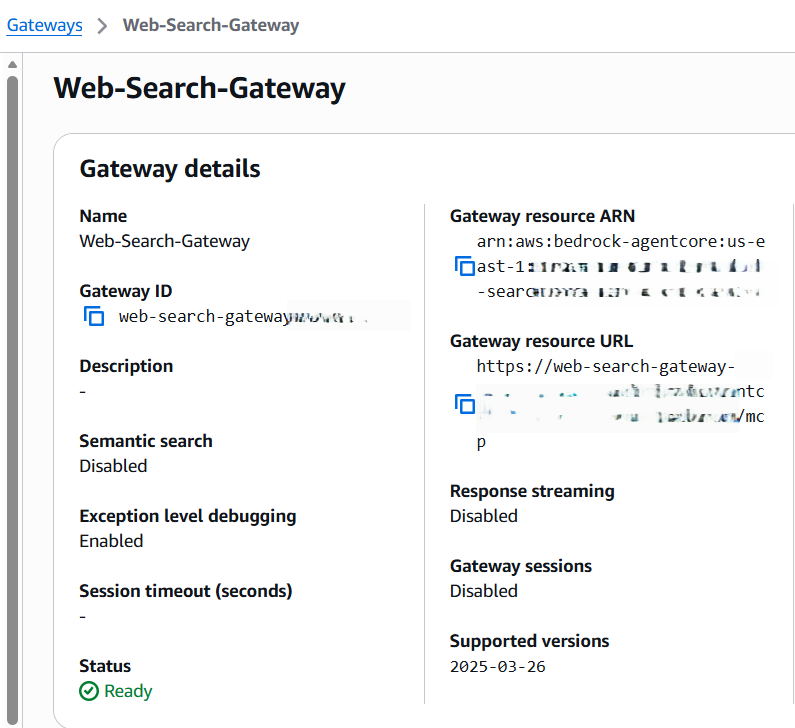
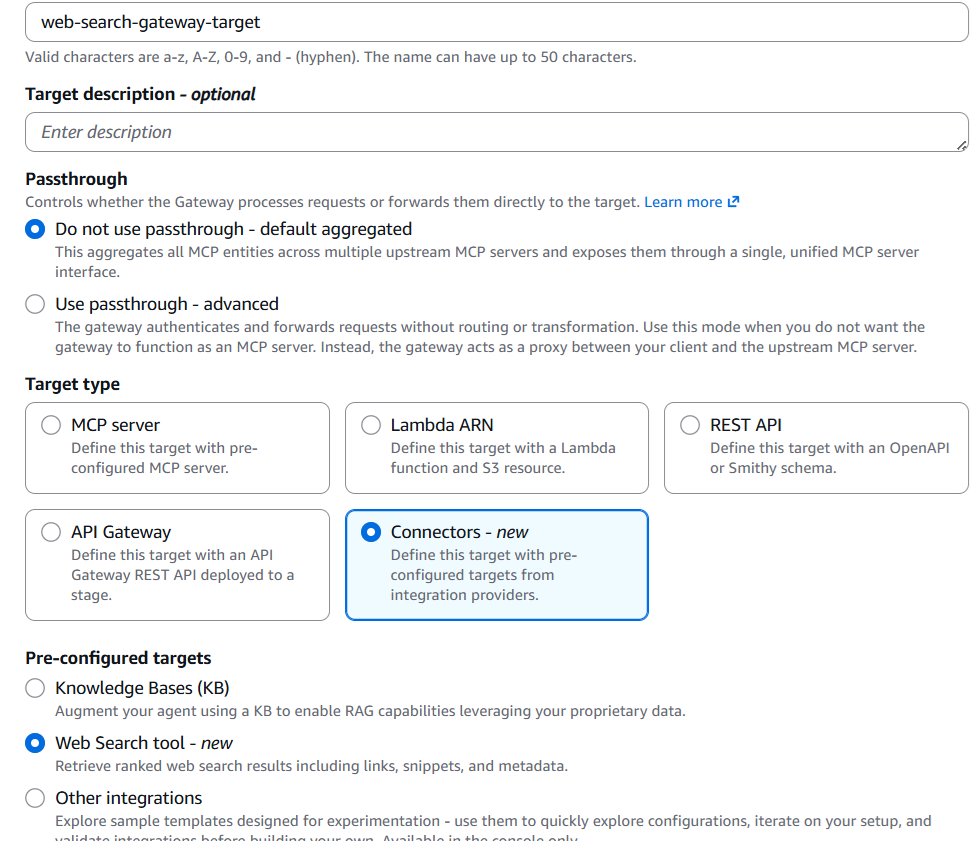
We’ll need the Gateway Resource ARN and Gateway Resource URL later. Then we need to create the AgentCore Target by selecting the MCP Target and the Web Search tool in the Connectors section.
We’ll need to define an IAM role with the following policy, as described in the article above:
Please replace the {YOUR_AGENTCORE_GATEWAY_ARN} with the ARN of your created AgentCore Gateway.
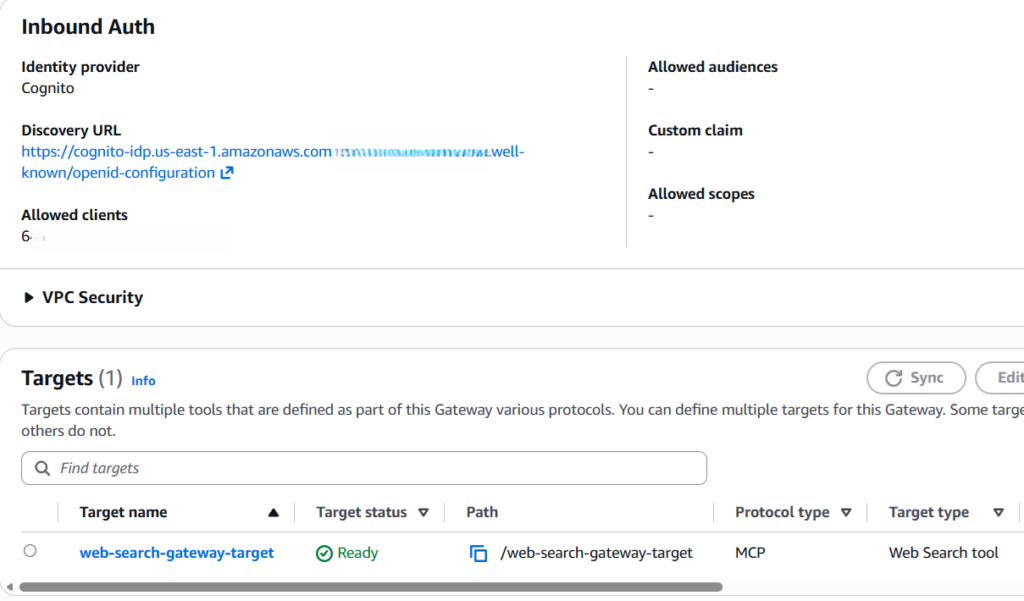
Another question is how to set up the inbound authorization of our AgentCore Gateway. We can put it completely public, which is not recommended. Another alternative is to use IAM-based inbound authorization. In this article, we’ll use JSON Web Token (JWT)-based inbound authorization with Amazon Cognito as an identity provider as we see in the picture above. I won’t go into the details of how to create and configure the Cognito User (Client) Pool, but refer to my following articles:
Alternatively, please look into the Cognito and Gateway stack of the spring-ai-2.0-ai-agents-on-agentcore-runtime/cdk repository for an example of how to set it up.
How to implement the Amazon Bedrock AgentCore Gateway Web Search Tool using Spring AI
I’ve already covered how to talk to an LLM and use the MCP Client to connect to tools with Spring AI in my following articles:
Please go through those articles first to understand the basics, as we’ll reuse much of the business logic. Let’s first configure the AgentCore Gateway resource URL and Cognito settings in the application.properties file:
Please split this URL into 2 parts: the base URL and the endpoint, which is always /mcp.
The implementation of the webSearch method in the AuthorContentWebSearchExtractorController controller looks like this:
This is a generic method that takes the following parameters:
- object of type Author.
- search topic (“search for upcoming talks” or “search for YouTube videos” in our case)
- maximum number of results returned by the Web Search tool. Valid range: 1-25. Defaults to 10.
- result type (UpcomingTalks or YouTubeVideos in our case)
First, get the authentication token from Amazon Cognito. We can remove this part, including setting this token in the header of the HTTP Streamable Client, in case our AgentCore isn’t secured by the JWT (either public or we use IAM authorization). Next, we create the MCP client and initialize it. After that, we list the MCP tools available; in our case, only the WebSearch tool. Then, we create MCPToolCallbackProvider with the MCP client. Next, we construct the parametrized prompt by passing the author, the search topic, and the number of results. We also advise an LLM to return the response in JSON format, which our Lambda functions require.
Finally, we use the ChatClient from Spring AI to pass the prompt, the tools, and the result type. We implement the last one by using the entity method, which tries to provide the structured LLM output. Once again, for more details about this code, I refer to my articles mentioned above. We invoke the websearch method from the controller’s methods searchForUpcomingTalks and searchForYouTubeVideos with different parameters.
IaC for the sample application using AgentCore Gateway Web Search Tool and Spring AI hosted on AWS Lambda
The IaC part in the AWS SAM Template matches what we described in part 6. There are, of course, some differences, as we need to give our 2 Lambda functions, which implement the AI agents, more permissions. We need these permissions to grant those Lambda functions access to the Cognito, AgentCore, and Bedrock services. Here is an example of the UpcomingTalksWebSearchExtractorFunction Lambda function declaration:
The declaration of the YouTubeVideosWebSearchExtractorFunction Lambda function looks very similar.
Building, packaging, deploying, and testing our sample application
Now we can build and package our application with mvn clean package and deploy it with sam deploy. The deployment process can take up to 10 minutes because of the creation and mounting of S3 Files.
To test our Lambda durable function, we can navigate to the Lambda service, search for the AuthorContentWebSearchExtractor function, and go to the “Test” tab.
We need to pass the following sample JSON Event to it, which represents the author:
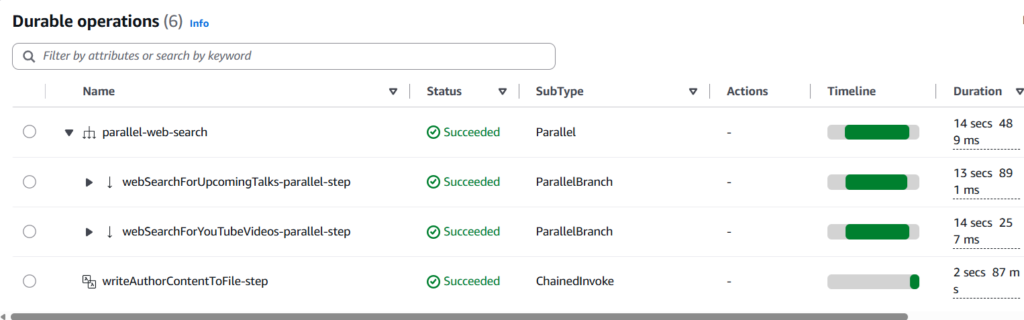
Then we can test it. After that, we go to the “Durable execution” tab and can see all the execution details:
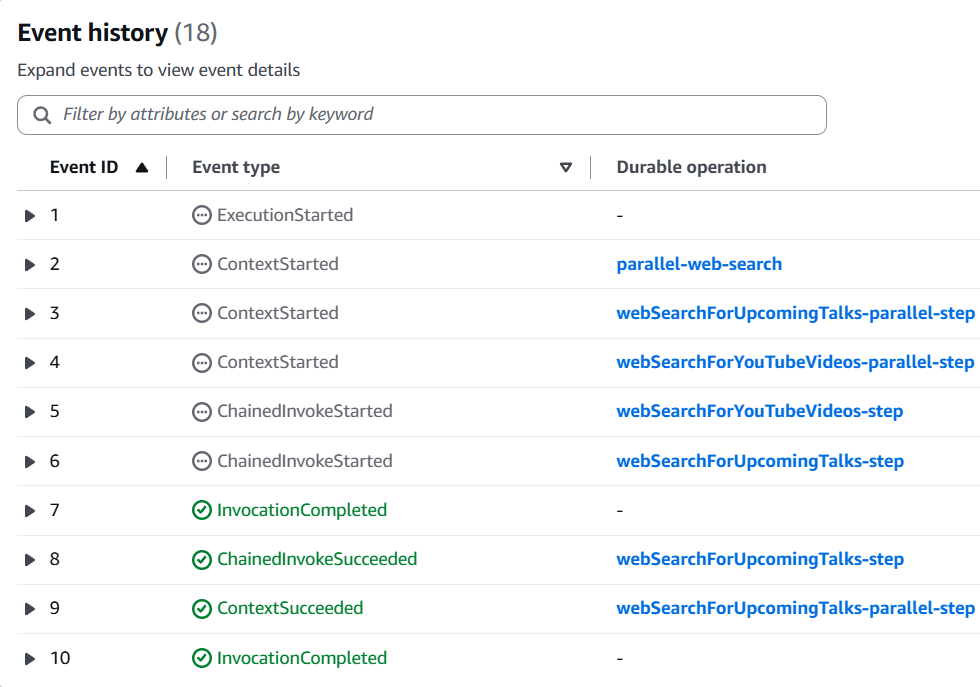
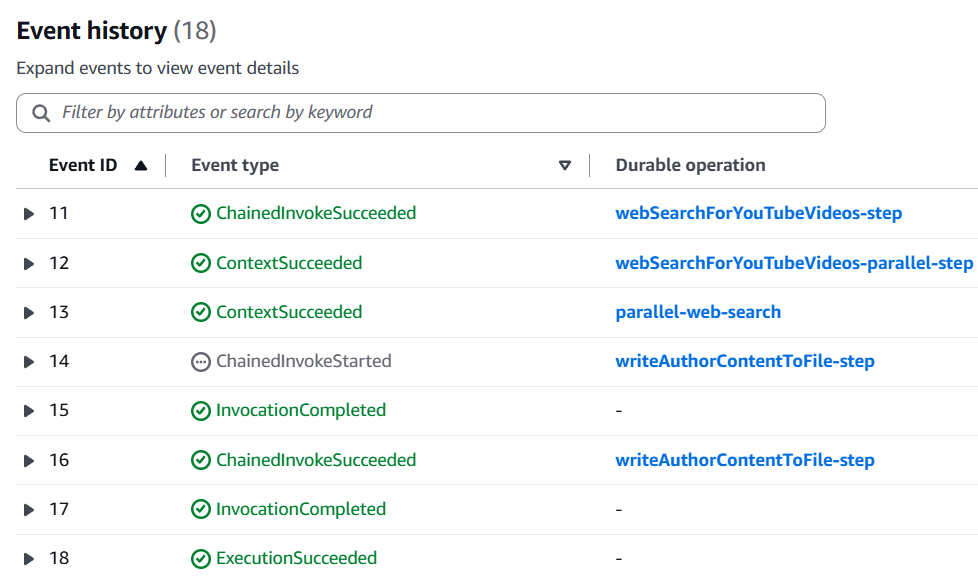
Let’s also look at event history:
We see that this matches what we implemented. Our Lambda durable function invokes 2 Lambda functions in parallel to search for YouTube videos and upcoming talks (each in an individual branch). Then, it awaits the results of both invocations because we defined in the parallel configuration that we wait until all invocations are completed. Then the last Lambda function to write the author content into the file gets invoked. This process is the same as we described in part 6, as the workflows remained the same. We only changed the implementation of 2 Lambda functions responsible for the content search. Now we use the AgentCore Gateway Web Search Tool for it.
Conclusion
In this article, we transformed our application into an agentic one. We replaced the search for YouTube and upcoming talks with the AgentCore Gateway Web Search Tool. –Also, we used the Spring AI framework to implement the AI agent and AWS Lambda to host it.
As we saw, Lambda durable functions provide a lot of building blocks like synchronous and asynchronous steps, invocation of another Lambda function, invoke async, waits, and callbacks (and combinations of both, like wait for the callback) and parallel execution to orchestrate the AI agents and multi-step workflows. We only showed one simple example of how to orchestrate the AI agent by using another Lambda function invocation and parallel execution.
In the next part, we’ll show how to host those AI agents on the AgentCore Runtime instead.
If you like my content, please follow me on GitHub and give my repositories a star!