Orchestrating workflows with Amazon S3 Files and AWS Lambda durable functions using Java SDK – Part 4 Wait for condition
Introduction
In part 2 of the series, we explored how to use the AWS Lambda Durable Execution SDK for Java to create and execute durable steps synchronously and asynchronously. Later, in part 3 of the series, we explored how to use the AWS Lambda Durable Execution SDK for Java to implement wait and callback.
In this part, we’ll explore the wait for condition operation.
Sample application with wait for condition
Let’s explore the wait for condition operation. We get access to it through DurableContext. It repeatedly calls a check function until it signals done. Between polls, the Lambda suspends without consuming compute. State is checkpointed after each check, so progress survives interruptions.
I first copied the application that we created in part 3 into the aws-s3-files-lambda-durable-functions-with-wait-for-condition-java-25 repository. The only change we had to make was to reimplement the waitForUpcomingTalksApproval method of the AbstractAuthorContentExtractor class. Here we’ll now use the “wait for condition” instead of the “wait for callback” operation.
This is how the code now looks:
Let’s go step by step through this code. First, let’s look at the waitForCondition invocation on the DurableContext. It receives the current state and a StepContext, and returns a WaitForConditionResult. WaitForConditionResult contains the result type, in our case UpcomingTalkApprovalStatus :
- WaitForConditionResult.stopPolling(value) – condition met (in our case, status “APPROVED”), return value as the final result.
- WaitForConditionResult.continuePolling(value) – keep polling (bacause the status is “NOT_APPROVED”), pass value to the next check.
For the sake of simplicity, we haven’t implemented the proper endpoint to poll the status. We provided a simple implementation in the getUpcomingTalkApprovalStatus method, which generates a random integer between 0 and 3. If 3 is generated, the “APPROVED” status will be returned, indicating that the condition is met and the polling should stop. If 0, 1, or 2 are generated, the operation will keep polling.
Next, let’s look at how to configure WaitForConditionConfig. First, we pass the initialState with the status “PENDING,” and this status is passed to the first check invocation. After that, we also configure the waitStrategy. The wait strategy controls the delay between polls. By default, waitForCondition uses an exponential backoff wait strategy (60 max attempts, 5s initial delay, 300s max delay, 1.5x backoff rate, FULL jitter). We can invoke the WaitStrategies.exponentialBackoff method to configure exponential backoff with different settings than the default ones. Alternatively, we can use the WaitStrategies.fixedDelay method. With this wait strategy, we need to configure:
- fixedDelay – a constant delay between polls and
- maxAttempts – a maximum number of attempts before throwing WaitForConditionFailedException. This exception is thrown when the maximum attempts are exceeded (thrown by the wait strategy).
We can also implement Custom Wait Strategies, which we won’t cover in this article.
That’s it. There are no changes in the Infrastructure as Code part that we need to make. Now we can build and package our application with mvn clean package and deploy it with sam deploy. The deployment process can take up to 10 minutes because of the creation and mounting of S3 Files.
To test our Lambda durable function, we can navigate to the Lambda service, search for the AuthorContentExtractor or AsyncAuthorContentExtractor function, and go to the “Test” tab.
We need to pass the following sample JSON Event to it, which represents the author:
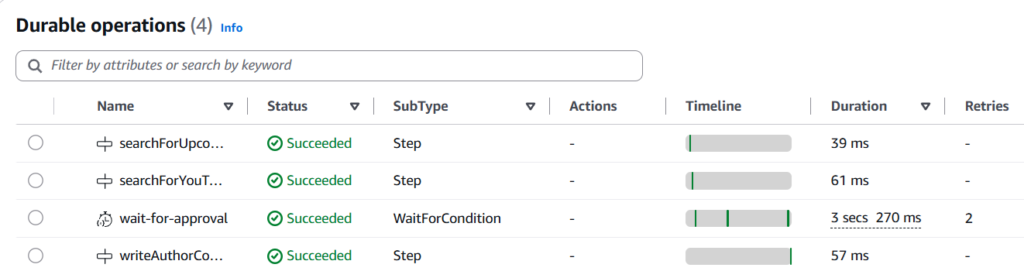
Then we can test it. After that, we go to the “Durable execution” tab and can see all the execution details:
Here we see that the operation with the name wait-for-approval and the subtype WaitForCondition succeeded after 3 attempts. The number of retries is 2. This means that it took 3 attempts to generate the integer 3. We defined the generation of this value as the condition to stop polling and return the result.
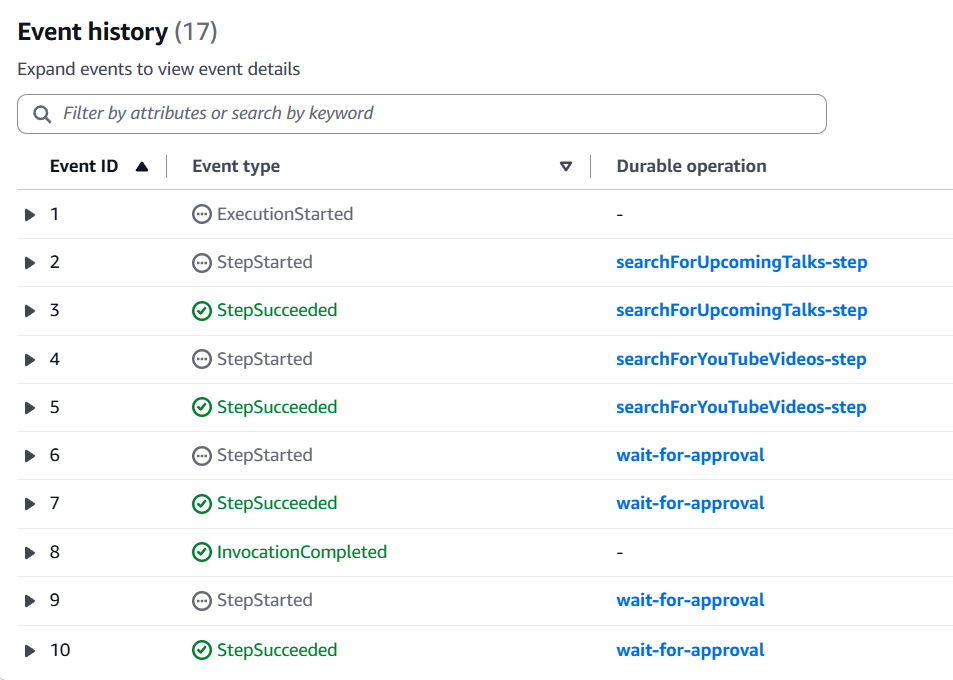
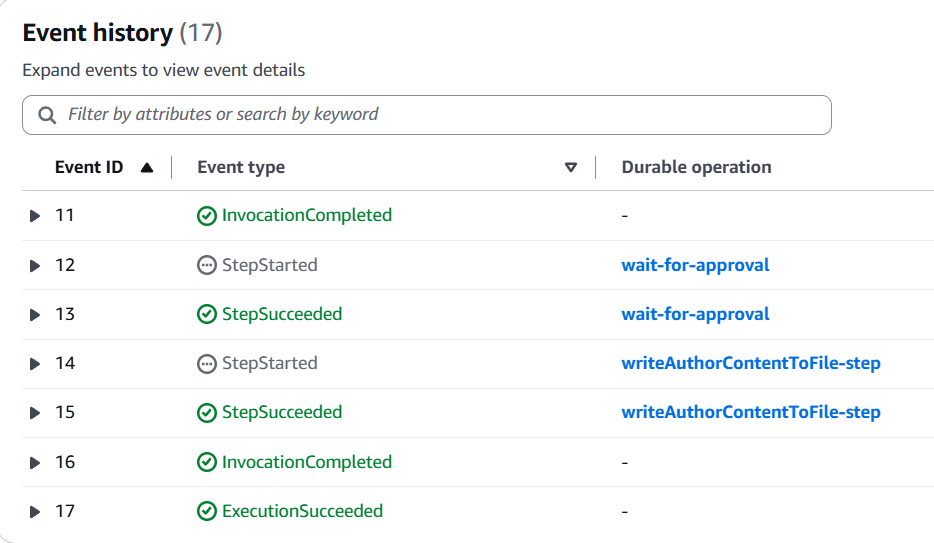
Let’s also look at event history:
Here we see all events (durable operations) in the right order required for the execution of our Lambda durable function.
There is also the waitForConditionAsync operation for non-blocking polling that you can explore on your own. It starts polling but returns a DurableFuture immediately, allowing other operations to run concurrently.
Conclusion
In this part of the series, we explored how to use the AWS Lambda Durable Execution SDK for Java to implement the wait for condition operation.
In the next part, we’ll explore map and child context operations. Still, our Lambda durable function itself contains too much business logic. Ideally, it should simply be the orchestrator and contain as little business logic as possible. That’s why, in the subsequent parts, we’ll move the logic for each step into a separate Lambda function. With that, we’ll explore how to invoke another Lambda function within the durable step. We’ll also show how to invoke multiple Lambda functions in parallel.
If you like my content, please follow me on GitHub and give my repositories a star!