Building AI Agents with Spring AI and Amazon Bedrock AgentCore – Part 5 Deploy MCP client for Conference application on AgentCore Runtime
Introduction
In part 2, we explained how to deploy and run our conference search application on the Amazon Bedrock AgentCore Runtime as the MCP server. In this article, we’ll develop the (MCP-) client, capable of talking to our application running on AgentCore Runtime. Later, in part 3, we developed the (MCP-) client, capable of talking to our application running on AgentCore Runtime. In part 4, we looked at how to provide the MCP Tools for the Conference application via AgentCore Gateway in a centralized way.
As we saw in previous articles, the local MCP client for the Conference application, to talk to AgentCore Runtime or Gateway, became quite big. If we have many customers using such a client, changing and operating it can become quite challenging. That’s why, in this article, we look at how to deploy and run our MCP client on AgentCore Runtime.
Update from July, 2026. After I published this article, Spring AI 2.0 became generally available. The changes that I need to make for that are the same that I described in part 4. Please also check out my spring-ai-2.0-conference-app-agent-bedrock-agentcore-runtime repository with the updated sample application.
Implement the MCP client for the Conference application and deploy it on AgentCore Runtime
Implement the MCP client for the Conference application
We’ll reuse the MCP client based on Spring AI that we implemented in parts 3 and 4. But as we need to make some small changes to deploy it on AgentCore Runtime, I created a new spring-ai-1.1-conference-app-agent-bedrock-agentcore-runtime. It consists of the agent and Infrastructure as Code subfolders.
Let’s first look at the changes that we need to make to the client. AgentCore Runtime also supports the HTTP protocol contract, which we’ll use to deploy our MCP client and talk to it. This contract puts some requirements on the client:
Container requirements:
- Host : 0.0.0.0
- Port : 8080 – Standard port for HTTP-based agent communication
- Platform : ARM64 Docker container – Required for compatibility with the AgentCore Runtime environment. I usually borrow t4g small EC2 instance on AWS to build it.
Path requirements:
- /invocations endpoint: POST endpoint for agent interactions
- /ping endpoint: GET endpoint for health checks
You can read more about this topic in the HTTP protocol contract article.
The only changes we need to make to our REST Controller are to implement these path requirements. If we use asynchronous communication, the entry point looks like:
For synchronous communication, the entry point looks like:
For adding the path to /ping, we have different options. We can either add such a simple method:
As we need to deploy our MCP client as an ARM64 Docker container, I also added a simple Docker file:
Please replace AWS {account_id} and {region} with our own values. Also, your version may not be v1 but a different one.
We can also build the Docker image by using Buildpack support built into Spring instead of a Dockerfile. Just use the Maven task spring-boot:build-image.
We don’t need to make any other changes on the MCP client itself.
Implement Infrastructure as for Code MCP client for the Conference to be deployed on AgentCore Runtime
Let’s now cover the IaC part with CDK for Java, which I implemented in the RuntimeWithMCPStack stack. We’ve already covered many steps in creating the CDK App and Stack, and even the AgentCore Runtime with the MCP protocol in part 2. For a more detailed explanation, I refer to this article.
First, let’s take a look at the creation of the AgentCore Runtime:
Here we set some common properties, such as the runtime name, description, and protocol (in our case, HTTP).
Now let’s look at the relevant code parts to assign this code artifact to the AgentCore Runtime:
First, we get the value of the variable ecrImageURI, which points to the imageURI in the ECR we pushed previously. This is typically done in the cdk.json:
Please adjust the value so that it matches your imageURI. We use the placeholder {AWS_ACCOUNT_ID} there. The reason for it is that I don’t want to expose the AWS account ID publicly. That’s why I wrote the following utility method getContextVariableValueWithReplacedAccountId in the ConventionalDefaults class to replace the placeholder with the real value:
We use the placeholder for the AWS account ID as explained above. Here is the relevant code to grab the value of the roleArnForTheAgentCoreRuntime variable and set it to the execution role of the Runtime from the RuntimeWithMCPStack:
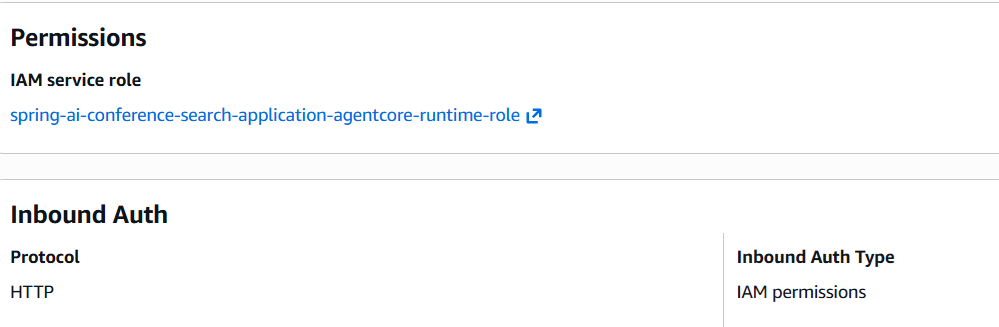
Here, we also use an IAM authorizer for the inbound AgentCore Runtime authentication. This is the default authentication and authorization mechanism that works automatically without additional configuration. You can also use JSON Web Tokens (JWT) as we showed in part 2.
Now we are ready to deploy our MCP client on the AgentCore Runtime. The command to do it is:
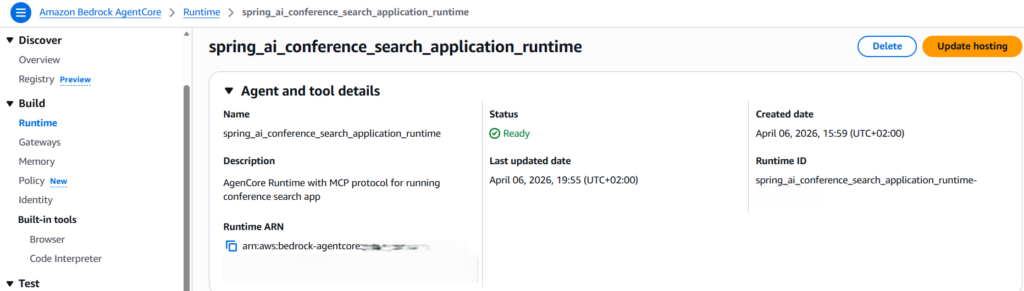
Here is how the AgentCore Runtime looks in the console after its creation:
We’ll need the Runtime ARN, which we see in the output of this command. Or we can grab it in the service console.
Implement the client to communicate with the Conference application deployed on AgentCore Runtime
Now we still need to write a client that communicates with our MCP client on the Runtime. I provided such an InvokeRuntimeAgent client written in Java, but you can use any programming language for which AWS provides a (bedrockagentcore) SDK:
First of all, we define RUNTIME_ARN, which we deployed in the step before. Please still use the {AWS_ACCOUNT_ID} placeholder, which will be dynamically replaced with your AWS Account ID. When we create BedrockAgentCoreClient. We also explicitly set the Apache HTTP client with the extended connection and socket timeouts. Default 30-second timeouts maybe to short for communication with the Runtime. Then we create InvokeAgentRuntimeRequest and set the agent Runtime ARN, qualifier (always DEFAULT), content type, and payload. The payload is our prompt. You can see the examples of the prompts in part 4 as we’re communicating with the same MCP client, but deployed elsewhere. When we invoke the invokeAgentRuntime method on the bedrockAgentCoreClient by providing the invokeAgentRuntimeRequest and convert the agent response to a string.
Conclusion
In this article, we looked at how to deploy and run our MCP client on AgentCore Runtime. With that, our MCP client now scales nicely within the Runtime.
Of course, you can create a nicer client by providing UI for entering the prompt and providing the agent response as a result. My goal was only to demonstrate how to implement such a client. Now we can change and redeploy our MCP client based on Spring AI on the AgentCore Runtime as often as we want. The client code remains unchanged as long as the Runtime ARN remains unchanged.
Starting from the next article, we’ll look at the Spring AI AgentCore functionality. Spring AI AgentCore SDK is an open-source library that brings Amazon Bedrock AgentCore capabilities into Spring AI through familiar patterns: annotations, auto-configuration, and composable advisors.
Please also check out my other series on Building AI Agents with Embabel, Spring AI, and Amazon Bedrock AgentCore.
If you like my content, please follow me on GitHub and give my repositories a star!