Building AI Agents with Spring AI and Amazon Bedrock AgentCore – Part 7 Use Spring AI AgentCore short-term Memory for MCP client on AgentCore Runtime
Introduction
In part 6, we used Spring AI AgentCore Starter in our sample application to deploy and run our MCP client on AgentCore Runtime. We used several useful features of the Spring AI AgentCore Starter, like annotation-based auto-configuration, smart health checks, and rate limiting.
Until now, our agent deployed on AgentCore Runtime was stateless. If we apply for conferences with some talks and then ask the agent in the next conversation about which talks we applied for which conferences, the agent won’t be able to answer. In this article, we’ll add the AgentCore Memory to our application. We’ll start with the short-term memory and later add the long-term memory. Then, we’ll show how to use Spring AI AgentCore Memory, which provides the Spring AI ChatMemory integration with the Amazon Bedrock AgentCore Memory service.
We’ll build on the spring-ai-2.0-ac-conference-app-agent-bedrock-agentcore-runtime sample application, which we introduced in part 6.
Spring AI AgentCore Memory
Spring AI AgentCore Memory provides Spring AI ChatMemory integration with the Amazon Bedrock AgentCore Memory service.
Its features currently include:
- Spring AI Integration: Implements ChatMemoryRepository interface
- Auto-configuration: Zero-configuration setup with Spring Boot
- Short-Term Memory: Conversation history with MessageWindowChatMemory
- Long-Term Memory: 4 consolidation strategies (Semantic, User Preference, Summary, Episodic)
To use Spring AI AgentCore Memory in our application, we need to add one more dependency to the pom.xml:
As stated above, in this article, we’ll cover short-term memory, leaving the long-term memory to the next article.
Create Bedrock AgentCore short-term Memory
We use Bedrock AgentCore Memory.Builder to set the memory name, description, and expiration duration, and then create the memory.
You can deploy the stack with the command:
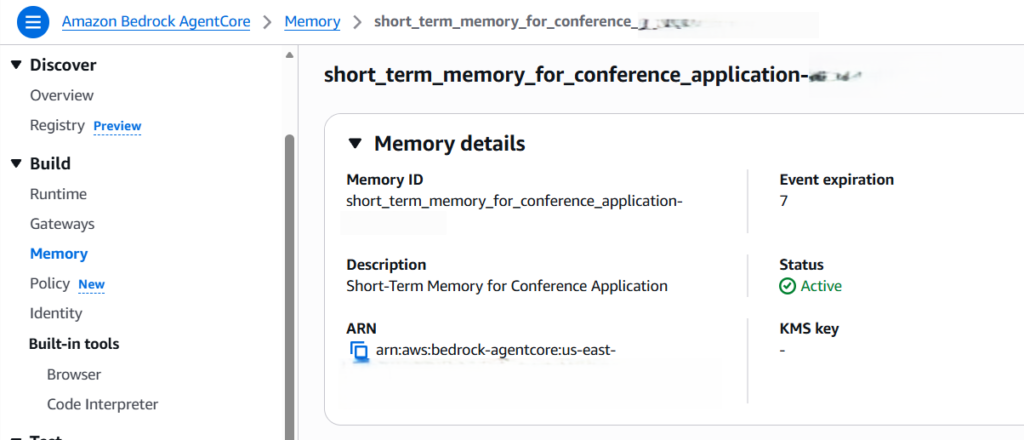
As we don’t set any memory strategy, the short-term memory will be created like this:
Also, the Memory ID will be printed out, which we will need to configure in our Spring AI application. We can find the same Memory ID in the service UI above.
Finally, we need to configure the following IAM permissions to allow our application running on AgentCoreRuntime to access this AgentCore Memory:
Configure Bedrock AgentCore short-term Memory in our sample application
To configure Bedrock AgentCore short-term Memory in our sample application, we need to make some changes to it. First, we need to configure some short-term memory-related properties in the application.properties:
Short-term Spring AI AgentCore Memory implements the Spring AI ChatMemoryRepository interface. That’s why, when we provide the memory configuration as above, Spring AI injects the correct implementation of the ChatMemory into the constructor. Then we use the Advisors API to build MessageChatMemoryAdvisor with the ChatMemory and to provide it as an input to the defaultAdvisors method of the ChatClient.Builder. Even if we don’t configure the AgentCore short-term Memory, the same code still works without throwing any exceptions. MessageChatMemoryAdvisor will be null, which Spring AI treats the same way as not setting any advisors. That’s all the changes we need to make to our application to use the AgentCore short-term memory.
In addition, we need to include a custom ChatMemory Conversation ID in the ChatClient. According to the documentation, the ChatMemory.CONVERSATION_ID parameter is required for all memory advisors. Calls that omit this parameter will throw an IllegalArgumentException at runtime, as there is no default conversation ID.
The Spring AI AgentCore long-term Memory supports flexible conversation ID formats:
- Simple: user123 → actor: user123, session: default-session
- With Session: user123:session456 → actor: user123, session: session456
This is how the code looks for it in the SpringAIAgentController:
As shown above, we defined a static CONVERSATION_ID. However, if you’d like to use individual IDs depending on the actor or user providing the prompt, you can add the login functionality and set the individual user ID. Finally, we set the value of the conversation ID as the parameter of the memory advisor.
Then we need to rebuild the Docker image of our application and deploy it to the Amazon ECR. After that, we need to configure the correct ecrImageURI in the cdk.json. We covered those concepts in parts 2 and 4.
Finally, we need to redeploy the AgentCore Runtime stack with the command:
Now, we can use the InvokeRuntimeAgent class to send prompts to our agent running on AgentCore Runtime. We described this in part 5 and can reuse these prompts to apply the talks to the conferences.
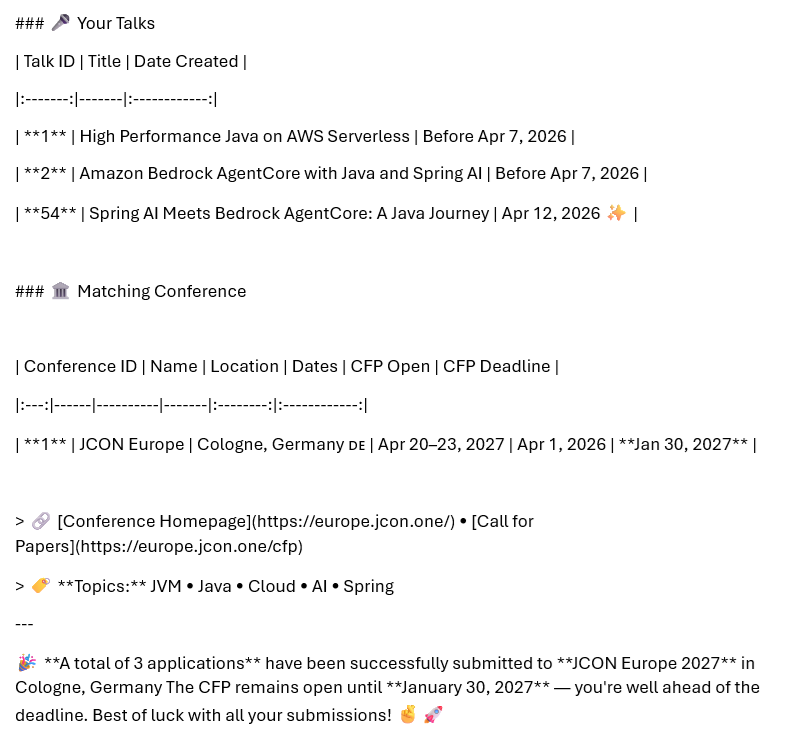
But now, additionally, we can ask such questions as: “You recently applied for some conferences for me. Can you provide me with the details?” The agent will give us a reply similar to the reply shown below, which shows that it provided the answer using the AgentCore short-term Memory:
Conclusion
In this article, we explained how to add and use AgentCore short-term Memory to our application with the help of Spring AI AgentCore Memory. In the next article, we’ll use AgentCore long-term Memory instead.
Please also check out my other series on Building AI Agents with Embabel, Spring AI, and Amazon Bedrock AgentCore.
If you like my content, please follow me on GitHub and give my repositories a star!